Shopify store
A bold snowboard storefront reaches Shopify’s checkout; the test order could not be completed there.
- Result: Fail
- Checks: 4 of 6 pass, 2 not checked
- Prompts: 3
- Time: 9m27s in total
- Spent: $0.24
Checks
- Pass: A signed-out visitor sees products from the Shopify store, not sample products · Signed out, browsed 61 products; The Hydrogen Snowboard matched its photos and details on the Shopify store.
- Pass: A product page shows the product's live price and whether it is in stock · The Hydrogen Snowboard page showed $500.00 and In stock, the same price as on the Shopify store.
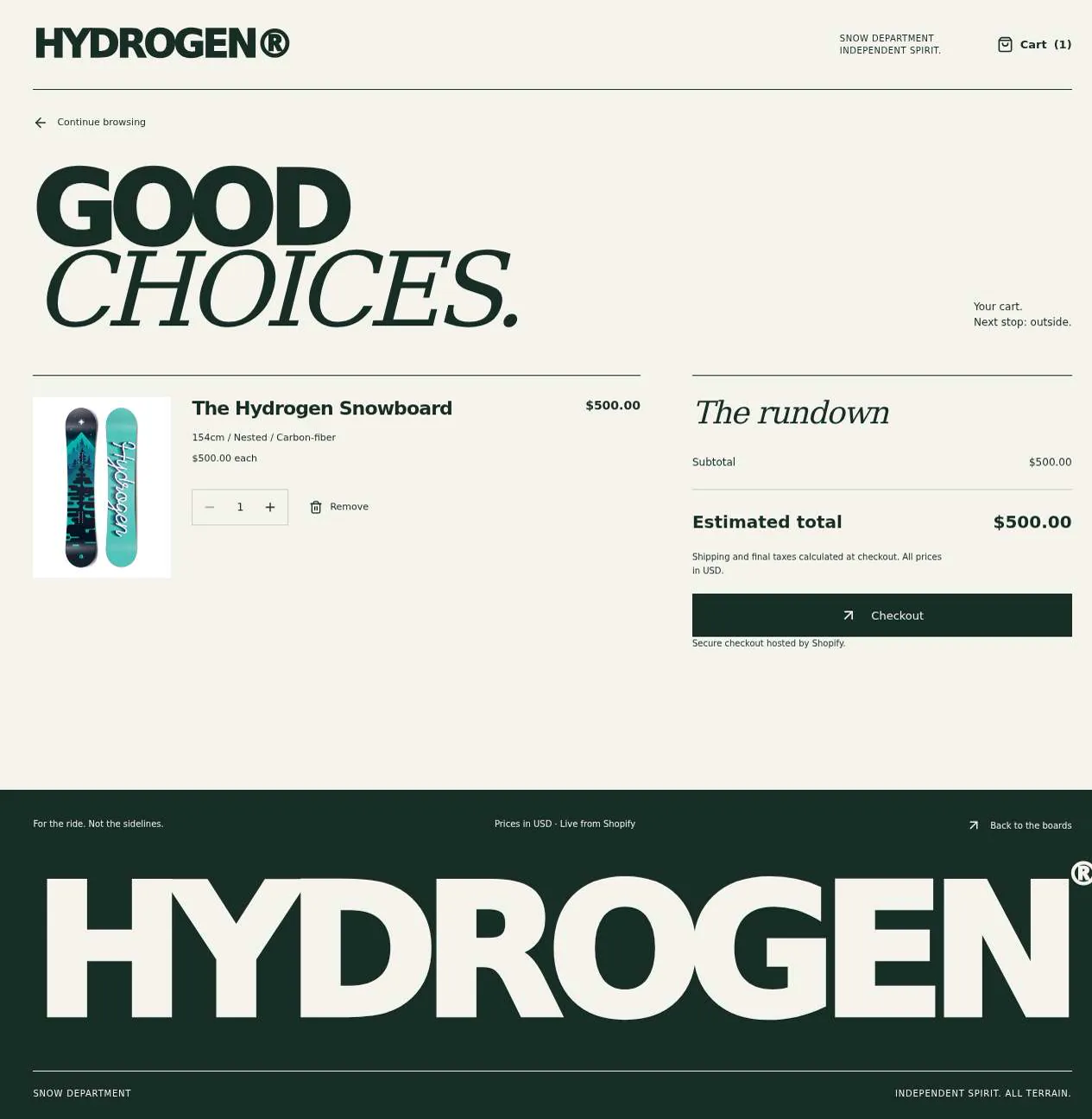
- Pass: Adding a product to the cart shows it with its live price and a total · Added The Hydrogen Snowboard (154cm) and opened the cart: one item at $500.00, total $500.00.
- Not checked: Checking out completes an order in Shopify's checkout, with a test payment, for the cart's items · Checkout opened Shopify's checkout with the snowboard at $500.00, but the checker can't pay on Shopify's page.
- Pass: The storefront has its own visual identity, not a default theme look · Home, product page and cart share big snowboard photos, heavy display type with italic serif, forest green and cream with lime accents.
- Not checked: A visitor can go from a real product to a completed Shopify order with that product in it · Went from the snowboard's page through the cart to Shopify's checkout with the right item, but couldn't complete the order there.
Run
- Run: 11 Nov 2026 · vibe prompts
- Builder: the Framer 4 agent on GPT 6.1 Sol, in a new project
- Customer: an AI agent playing the owner of Hydrogen, writing in the Tweak style
- Agent steps: 10 tool steps
- Prompt limit: 40 per app
- Cost: $0.19 for the builder, $0.05 for the judge
- Judge: an AI agent that tried each check in the live preview with a browser, as a signed-out visitor
Shopify store
A bold snowboard storefront reaches Shopify’s checkout; the test order could not be completed there.
- Result: Fail
- Checks: 4 of 6 pass, 2 not checked
- Prompts: 3
- Time: 9m27s in total
- Spent: $0.24
Prompt 1 of 3
I want to start with the live catalogue for Hydrogen. Please show the real products from our existing Shopify store, hydrogen-preview.myshopify.com, so anyone can browse without signing in—no sample products. When I open a product, I want to see its current price and whether it’s in stock, straight from the store. Give it our own attitude with big product photos and bold type, more street/skate like Palace or Aimé Leon Dore than a standard Shopify theme.
Built the public Hydrogen catalogue with 61 real Shopify products,
- Pass: A signed-out visitor sees products from the Shopify store, not sample products · Signed out, browsed 61 products; The Hydrogen Snowboard matched its photos and details on the Shopify store.
- Pass: A product page shows the product's live price and whether it is in stock · The Hydrogen Snowboard page showed $500.00 and In stock, the same price as on the Shopify store.
Prompt 2 of 3
Next, I want shoppers to be able to add products to a cart, see the items with their current Shopify prices and the total, then head to Shopify’s own checkout. Please make sure the cart’s exact items carry through and that an order can be completed with a test payment on hydrogen-preview.myshopify.com. Keep the cart feeling like part of the Hydrogen storefront.
Added a cart with live Shopify prices, totals, quantity editing and
- Pass: Adding a product to the cart shows it with its live price and a total · Added The Hydrogen Snowboard (154cm) and opened the cart: one item at $500.00, total $500.00.
- Not checked: Checking out completes an order in Shopify's checkout, with a test payment, for the cart's items · Checkout opened Shopify's checkout with the snowboard at $500.00, but the checker can't pay on Shopify's page.
Prompt 3 of 3
Now I want to focus on making the storefront unmistakably Hydrogen, rather than a dressed-up standard theme. Give it a strong art direction: oversized snowboard photos, bold type, and a street/skate editorial feel inspired by Palace or Aimé Leon Dore, without copying them. Bring out the craft and detail of the boards, and carry that same personality through the catalogue, product pages and cart. Keep the real products and shopping flow we already have working.
Hydrogen now has a stronger editorial identity: oversized board photography, bold
- Pass: The storefront has its own visual identity, not a default theme look · Home, product page and cart share big snowboard photos, heavy display type with italic serif, forest green and cream with lime accents.
- Not checked: A visitor can go from a real product to a completed Shopify order with that product in it · Went from the snowboard's page through the cart to Shopify's checkout with the right item, but couldn't complete the order there.
Shopify store
A bold snowboard storefront reaches Shopify’s checkout; the test order could not be completed there.
- Result: Fail
- Checks: 4 of 6 pass, 2 not checked
- Prompts: 3
- Time: 9m27s in total
- Spent: $0.24
Custom storefront for an existing Shopify store
Hydrogen is a snowboard brand, and this is its own storefront: a shop with real attitude that replaces a Shopify theme that looked like every other store. It has big product photos, heavy type and a street and skate editorial feel, in the spirit of Palace or Aimé Leon Dore without copying either. Every product, price, variant and stock level comes live from Hydrogen's existing Shopify store, hydrogen-preview.myshopify.com, through the Shopify Storefront API. The cart is a real Shopify cart, and paying happens in Shopify's own checkout. The store takes real payments, so checks go up to Shopify's payment step and no order is placed.
The app has one role.
- Visitors: browse the catalogue, search, open products, choose a size or variant, build a cart and check out in Shopify's checkout. They never sign in to the storefront.
On first open, the storefront shows the store's real catalogue of about 60 products, its real collections and its real policies, all read from Shopify, plus brand copy written for Hydrogen.
Nothing is broken and everything works. Every button, link and form does what it says with real data. No page shows placeholder text, sample products, sample images, "coming soon", "not set up yet", lorem ipsum or a link to nowhere.
These are not part of the Hydrogen storefront: customer accounts or order history on the storefront, a payment form of its own, discounts or gift cards managed outside Shopify, a blog or journal, a newsletter signup, wishlists, product reviews, product recommendations, a full-screen photo viewer, a store locator, and editing products anywhere but in Shopify.
Brand and visual direction
Hydrogen's customers are riders aged roughly 18 to 35 who skate in summer and ride park and backcountry in winter. They know their gear, follow skate and streetwear labels, and can tell a template store from a brand with a point of view in one scroll. They want to see the board up close, know the price and whether their size is in stock, and get to checkout without friction. Name and voice: The brand is Hydrogen, with the line "Boards for people who ride." The copy is short, dry and confident, like a skate brand's caption, never a sales pitch: "Add to cart", "Sold out", "154 cm", "Checkout", "Free shipping over $100" only if the store's policy says so. Product facts are stated plainly. It uses no exclamation marks, emoji or hype words such as "epic", "elevate", "supercharge", "unleash" or "game-changing". Visual direction: Hydrogen looks like a printed lookbook crossed with a skate shop wall: huge product photos, heavy uppercase type, and hard edges.
- Colour: an off-black page for the home page and product heroes (about #111111), a raw paper white for reading surfaces (about #F2F0EA), mid grey for secondary text (about #6E6E6E), and one accent, a high-visibility yellow (about #E5F230), used only for Add to cart, Checkout, the cart count and focus states. Sold out uses grey, never red. There are no gradients, glows, glass effects or purple-blue palettes.
- Type: Archivo Black for display headings and product names, set uppercase, large and tight, with Archivo Expanded for small labels such as sizes and collection tags; Space Grotesk for body text, prices and product details. Prices use tabular figures. Body text is 15 to 16 px. The home page's first heading is at least 96 px on desktop.
- Shape: square corners everywhere (0 to 2 px), 1 px rules instead of shadows, and full-bleed photos that run to the edge of the screen. Buttons are solid blocks of colour with uppercase labels.
- Layout: a 12-column grid with a maximum content width of about 1440 px, though photos may run full width. Product grids have 4 columns on wide screens, 3 on desktop, 2 on tablet and 2 on phone, with tight 8 px gutters. The header is slim and sticky: the Hydrogen wordmark, Shop, the store's main collections, Search and a Cart button with the item count.
- Imagery: only the store's real product photos from Shopify, shown large and cropped with intent (a full board on product pages, a close crop of the base graphic on cards when a second photo exists). There are no stock photos, 3D renders, AI illustrations or decorative icons.
- Motion: short (150 to 200 ms) fades, and a card swapping to its second product photo on hover. The cart slides in from the right in 200 ms. Nothing bounces or parallaxes.
- Every page works at 390 px wide with no horizontal scrolling, every control is usable by keyboard with a visible focus ring, and Add to cart stays reachable on a phone without scrolling back up.
Pages beyond the product: The footer links to real pages with real content: About (Hydrogen's story, written for the brand in its voice), Size guide (which board length fits which rider height and weight, written for Hydrogen), and the store's own Shipping, Refund, Privacy and Terms policies, read from Shopify. A policy the store does not have is not linked. A branded not-found page links back to the shop.
Checks:
- Every page shows the Hydrogen wordmark and the same header and footer, and every footer link opens a page with real content, including policies that match the store's policies in Shopify
- The design follows the direction above: off-black and paper white surfaces, heavy uppercase Archivo Black headings with Space Grotesk text, one high-visibility yellow accent for Add to cart and Checkout, square corners and full-bleed product photos, with no gradients or stock imagery
- The home page, a product page and the cart have no horizontal scrolling at phone width, and Add to cart and Checkout stay reachable
- Opening a made-up address shows a branded not-found page with a way back to the shop
Catalogue: what Hydrogen starts with
The storefront holds no copy of the catalogue. On every visit it reads the store hydrogen-preview.myshopify.com through the Shopify Storefront API: about 60 products, among them The Hydrogen Snowboard at $500.00, with their titles, descriptions, photos, product types, tags, variants (such as board lengths), prices, compare-at prices where the store sets them, and whether each variant is available for sale. It also reads the store's collections with their titles, descriptions and images, its currency, and its policies. A change made in Shopify (a new price, a sold-out size, a new product) shows on the storefront on the next page load, without any step in the storefront. Products that are not published to the storefront's sales channel do not appear. A product with no photo shows its title on a plain block in brand colours, never a grey box or a stock photo. The only content the storefront writes itself is brand copy: the home page's headings and short texts, the About page, the Size guide, and short introductions for collections that have no description in Shopify. All of it is written for Hydrogen. None of it is filler.
Checks:
- The shop shows the store's real products, about 60, and The Hydrogen Snowboard shows at $500.00, matching the store
- Ten products picked at random each show the same title, photos, price and variants as in the Shopify store
- The collections in the menu are the store's real collections, and each lists the same products as in Shopify
- No product, image or text looks like filler: no sample products, repeated photos, grey boxes or lorem ipsum
Visitor: the home page
The home page is an editorial front page, not a grid dump. Hero: One product shot fills the first screen edge to edge, with a huge uppercase heading over or beside it, the product's name and price, and a Shop button. The product is a real product from the store, picked from its featured or first collection. Collections: A band of the store's main collections, each with its image or a product photo, its name and the number of products, linking to the collection page. New and featured: A row of 8 product cards from the store's newest products, and a second row from another collection, each with a "View all" link. Brand strip: A short block of Hydrogen's voice with a link to About, set in large type on the off-black page. Cards: Every product card shows a large photo (switching to the product's second photo on hover where one exists), the product name, the price (a range such as "$450 to $520" when variants differ, or the compare-at price struck through next to the sale price), and a small "Sold out" label when no variant is available. Clicking anywhere on the card opens the product page.
Checks:
- A visitor opening the home page sees a full-width product photo with a large heading, collection links and rows of real product cards
- Hovering a product card with more than one photo shows its second photo, and clicking the card opens its product page
- A product with no available variant shows "Sold out" on its card, and a product on sale shows the sale price with the compare-at price struck through
Visitor: browsing collections and the shop
"Shop" opens every product in the store. Each collection has its own page with its title, its description (or a Hydrogen introduction), the number of products, and the same grid. Sorting: Featured (the store's own collection order, the default), Newest, Price low to high, Price high to low, and Best selling, all done by Shopify. Filters: Availability (In stock only), Product type, and Price range, using the store's real values. Board length appears as a filter where the store has it as a variant option. Active filters show as removable chips with a "Clear all" link, and the product count updates. Shareable addresses: The collection, sort and filters are in the page's address. Opening the address in a new window shows the same products in the same order, and Back and Forward step through filter changes. Many products: The first 24 products load with the page, and "Load more" adds 24 more without repeating or re-sorting the cards already shown.
Checks:
- Opening a collection shows only that collection's products, with its title and product count
- Sorting by Price low to high puts the cheapest product first and the most expensive last
- Turning on "In stock only" hides every product that is sold out in Shopify, and removing the chip brings them back
- Copying the address after choosing a collection, a sort and a filter, and opening it in a new window, shows the same products in the same order
- A filter combination with no matches says so and offers to clear the filters, instead of showing a blank grid
Visitor: search
Search sits in the header on every page. It opens a full-width panel where typing shows up to 6 matching products with photo, name and price as suggestions, and Enter opens a results page. Search uses Shopify's own product search, so it matches titles, product types, tags and descriptions, and tolerates partial words. The results page has the same sort and filters as a collection, and the query is in the address. Escape closes the panel. When nothing matches, the page says so ("Nothing matches 'zzqx'"), suggests checking the spelling, and shows the store's main collections.
Checks:
- Typing part of a product's name in the header search shows that product as a suggestion, and choosing it opens its page
- Searching for "snowboard" shows only products that match, and the results can be sorted and filtered
- A search with no matches shows the empty state with links to collections
Visitor: product page
Each product has its own page at a readable address that uses its Shopify handle, such as /products/the-hydrogen-snowboard. Photos: A large gallery takes most of the screen on desktop, with every photo the product has in Shopify. On desktop, photos stack in a tall column next to the product details. On a phone, they become a swipeable strip with a position indicator. Details: The product name in large uppercase, the price of the selected variant (with the compare-at price struck through when it is on sale), the product type and the description from Shopify with its formatting. Variants: Each option the product has (for example Size) shows as a row of square buttons with the store's real values, such as 148, 154 and 158. A value whose variant is not available for sale is crossed out and cannot be chosen. Choosing a variant updates the price, the photo where the variant has its own image, and the page's address, so a link opens with that variant chosen. A product with a single variant shows no selector. Stock: Clear words next to the button: "In stock" or "Sold out" for the selected variant, straight from Shopify. When every variant is sold out, the button reads "Sold out" and cannot be pressed. Add to cart: A quantity stepper (1 to 10) and the yellow Add to cart button. Pressing it adds the chosen variant to the Shopify cart and opens the cart drawer showing it. Until a required option is chosen, the button reads "Choose a size". On a phone, a slim bar with the price and Add to cart stays at the bottom of the screen once the main button scrolls out of view. Below: The Size guide as a short table for boards.
Checks:
- A product page shows every photo from Shopify, the live price, the description and "In stock" or "Sold out" matching the store
- Choosing a different size updates the price and the address, and opening that address in a new window shows the same size chosen
- A size that is sold out in Shopify is crossed out and cannot be added to the cart
- On a phone, the product photos swipe with a position indicator
- Opening /products/ with a made-up handle shows the branded not-found page, not an error
Visitor: cart
The cart is a drawer that slides in from the right on every page, and also a full page at /cart. Lines: Each line shows the product photo, name, the chosen variant (such as "154 cm"), the unit price, a quantity stepper, the line total and Remove. Changing the quantity or removing a line updates the line total, the subtotal and the cart count in the header at once, with the amounts Shopify calculates. Totals: The subtotal in the store's currency, and a line saying that shipping and taxes are calculated at checkout. A yellow Checkout button sits under the subtotal. Keeping the cart: The cart is a real Shopify cart. It survives a reload, closing the tab and coming back the next day in the same browser. If a price changes or a variant sells out in Shopify while it is in the cart, the cart shows the new price, or marks the line as sold out and asks the visitor to remove it before checking out. Empty cart: An empty cart says "Your cart is empty" and links to the shop and the main collections. Errors: If Shopify cannot be reached, the drawer says the cart could not be updated and offers to try again. Nothing is silently lost.
Checks:
- Adding The Hydrogen Snowboard in 154 cm shows one line at $500.00 with a subtotal of $500.00 and a cart count of 1
- Changing that line's quantity to 2 changes the line total and subtotal to $1,000.00 and the cart count to 2; Remove empties the cart
- Adding two different products shows both lines and a subtotal that is their sum
- After a reload, and after closing and reopening the browser tab, the cart still holds the same lines
- An empty cart shows the empty state with links back to the shop
Visitor: going to Shopify's checkout
Checkout sends the visitor to Shopify's own checkout for hydrogen-preview.myshopify.com, using the checkout address that Shopify gives for this exact cart. Shopify may first offer Shop Pay, with a way to continue to the regular checkout. The checkout lists the same products, variants, quantities and prices as the cart. The storefront never collects card details itself, and it never sends the visitor to a payment page of its own. hydrogen-preview.myshopify.com is Shopify's live demo store. It takes real payments through Shopify Payments and has no test payment, so nobody completes an order on it, and checks stop at Shopify's payment step. Everything up to that step is real: Shopify accepts the visitor's email, shipping address and shipping method, and shows the shipping cost and total for this cart. Leaving the checkout without paying and coming back to the storefront keeps the cart as it was. Once Shopify turns a cart into an order, the storefront starts a fresh cart on the next Add to cart. If the cart is empty, Checkout is not shown. If a line sold out between adding it and checking out, the cart says so before sending the visitor on.
Checks:
- Pressing Checkout with two products in the cart opens Shopify's checkout for hydrogen-preview.myshopify.com, not a page of the storefront's own, listing exactly those products, variants, quantities and prices
- In Shopify's checkout, entering an email, a shipping address and a shipping method shows Shopify's shipping cost and a total for exactly the cart's items, up to the payment step (no payment is entered)
- Going back to the storefront from the checkout without paying shows the same cart with the same lines and subtotal
Speed and findability
The storefront feels fast even though every product comes live from Shopify. The first screen of the home page, a collection and a product page shows its photos and prices as soon as the page loads, without waiting for scripts. Product photos are served at the size they are shown, using Shopify's resized image addresses rather than full-size originals, load lazily below the fold, and keep their space reserved so nothing jumps while loading. One request to Shopify gives everything a page of cards needs, not one request per card. Prices and stock are never older than one minute. Every page has its own title and description. Product pages are titled "{Product name} | Hydrogen", with the first product photo as the share image and the price in the page's product details for search engines. Collection pages are titled "{Collection} | Hydrogen". A sitemap lists every published product and collection. Pasting a product's link into a chat app shows its name, photo and price.
Checks:
- The home page and a product page show their first photos and prices within about 2 seconds, and scrolling a collection does not shift the layout
- Product photos in grids are resized images from Shopify, not the full-size originals
- A product page has a title with the product's name, a description and a share image of its photo, and the sitemap lists the store's products and collections
Everything works
These checks apply to every screen above, for visitors. The number before each check is its weight: 3 means the app fails if the check fails, 2 a serious defect, 1 a defect worth noting.
For every app:
- Must pass: Every feature this spec describes is there, and each fix the agent claims holds when the original steps are repeated
- Serious: At phone (390 px), tablet (810 px) and desktop (1,200 px and up), the home page, a collection, the search panel and results, a product page with its photo strip and bottom Add to cart bar, the cart drawer, /cart and the policy pages show nothing cut off, no sideways scrolling, a reachable header with Search and Cart, and inputs of at least 16 px
- Serious: Every product card, collection link, search suggestion, footer and policy link goes to the right page; reloading a product page with a size chosen, a sorted and filtered collection, search results or /cart on the live address works; a made-up address and /products/ with a made-up handle show the branded not-found page; Back and Forward step through filter changes
- Minor: Product photos load as Shopify's resized images at their intended crop without stretching, a product with no photo shows its title on a brand-colour block, and pasting a product's live link into a chat app shows its name, photo and price, not a builder default
- Serious: Later work did not break earlier work: after search, the cart and the checkout handoff are built, the catalogue, collections, product pages, sorting and filters still work and are unchanged
- Minor: After each prompt, the agent's reply says honestly what changed and what it could not verify (including anything that still needs a key or account), is never empty, never presents preview-only as done, and never claims a fix that is not there in the live app
For this app:
- Must pass: Every flow works end to end with real Shopify data, checked where it lands: a product found by collection or search, with a size chosen, reaches the cart at Shopify's price, and Shopify's checkout for hydrogen-preview.myshopify.com lists exactly those items with Shopify's shipping cost and total up to the payment step; no sample product stands in for a Shopify one
- Must pass: The cart's lines, sizes and quantities stay as changed after a reload, after closing and reopening the tab, and after coming back from Shopify's checkout without paying, and Shopify's checkout shows the same lines
- Must pass: One visitor's cart cannot be opened by another: a second browser starts with an empty cart, and no storefront address shows another visitor's cart lines
- Must pass: No storefront page, the cart drawer or /cart asks a visitor to sign in or create an account, and a visitor reaches Shopify's checkout without one, continuing past any Shop Pay offer
- Serious: The published storefront behaves like the preview: the same live catalogue, prices, stock, cart and checkout handoff work there, and no live page mentions "preview" or shows a sample product
- Serious: Empty, loading and error states are clear and in plain words: an empty cart, a search with no matches, a filter combination with no matches, a sold-out size, "Load more" and cart updates in progress, and Shopify being unreachable ("the cart could not be updated", with Try again), with no technical, token or setup text
- Serious: The page source and network requests contain no Shopify Admin API token or private access token (only the public Storefront API token) and no other visitor's cart, and the footer links to the store's Privacy policy
- Minor: The quantity stepper stays between 1 and 10, Add to cart reads "Choose a size" until a required size is chosen, and pressing Add to cart twice in a row adds that size to one cart line with quantity 2, not two duplicate lines
- Minor: Search finds a known product by part of its name, "snowboard" returns only matching products, "zzqx" shows the empty state; combining In stock only, a product type and a price range gives the right products; each sort orders them correctly; the collection, query, sort and filters survive a reload and opening the address in a new window
Done when
Checks:
- A visitor can find a real product by collection, sort, filter or search, open it, choose an available size and see its live price and stock, all matching the Shopify store
- A visitor can build a cart of several products, change quantities, keep the cart across a reload, and go to Shopify's checkout with exactly those items
- A visitor reaches the payment step of Shopify's own checkout with exactly the cart's items and Shopify's total, and the cart is kept when they come back without paying
- Every page looks unmistakably like Hydrogen, loads fast, and nowhere shows a placeholder, sample product, dead link or "not set up" state
Shopify store
A bold snowboard storefront reaches Shopify’s checkout; the test order could not be completed there.
- Result: Fail
- Checks: 4 of 6 pass, 2 not checked
- Prompts: 3
- Time: 9m27s in total
- Spent: $0.24
Hydrogen: the simulated customer
An AI agent plays the owner of Hydrogen and writes every prompt. It reads the spec and this file, never the Framer 4 agent's code.
- Style: Tweak.
Persona and why it fits
Tweak. Storefront problems are visual and concrete (missing prices, an empty cart, a broken image), which a Tweak user names in a few words.
Prompt length and tone
- Length: 4 to 20 words, typically 6 to 10. One idea per prompt.
- Tone: Casual and terse, often lowercase, no greeting, the occasional typo. Names what they see, not how to fix it.
- Language: English only.
Example prompts for this app:
- "custom storefront for our snowboard brand on shopify, big photos, heavy type"
- "prices missing on the product cards"
- "cart icon doesn't show how many items"
Style mix
Tweak for 76% of prompts, Describe 18%, Specify 5%, Brief 0.5%.
Switches come early and cluster around breakage: a failed fix or an unrequested change makes the next prompt likelier to be longer and more exact.
How they choose the next prompt
One thing per prompt, the most visible one: a broken control or page first, then a missing feature from the spec, then something that looks off. They name it in a few words and let the agent work out the fix. Order of attention for this app:
- Anything broken: a control that does nothing, a page that errors, a broken image or link, a layout broken on phone, a claimed change that isn't there.
- Real products, prices, variants and stock from the Shopify store.
- Choosing a size or variant, search, and the cart.
- Checkout reaching Shopify's payment step with the same items.
- Everything else in the spec, including the brand and copy rules, in spec order.
How they react to breakage
- Reports it in one line, close to what they saw: "still doesn't open", "pic is stretched on my phone".
- If the same problem survives two fixes, they switch to a Describe-style prompt that says where it happens and what they expected (the 18% Describe share mostly comes from here).
- If an edit changed something they didn't ask for, they send one guarded Specify-style order ("only fix X, change nothing else"), then go back to short lines.
- If the agent says it's fixed and it isn't, they say so plainly: "you said it was fixed, it isn't".
Stop rule
- They keep prompting until the judge says every check in the spec is met, or until prompt 40, whichever comes first.
- The persona shapes how they prompt and react, never when they stop: no giving up, no stopping early because it looks good enough.
- The judge also grades whether the agent's replies are honest (claimed changes match the app), so the simulated user reports false claims as they see them and doesn't take a claim on trust.