Listings site
Every check passed: search, filters, submissions and an approval queue.
- Result: Pass
- Checks: 7 of 7 pass
- Prompts: 3; every check passed after prompt 3
- Time: 3m37s in total
- Spent: $0.69
Checks
- Pass: A signed-out visitor searches by a city and the list narrows to listings there · Signed out, typed Amsterdam into Search by city; six roasters narrowed to Friedhats, DAK and LOT61.
- Pass: Filtering by a feature shows only listings that have it · Clicked Has a café; Amsterdam narrowed to Friedhats and LOT61, and with no city four café listings showed.
- Pass: A signed-in member submits a listing and is told it is waiting for review · Signed in, submitted Amber Test Roastery in Delft and was told it is waiting for review; after a reload it showed Awaiting review.
- Pass: A submitted listing does not appear publicly before approval · Signed out, searching Delft found nothing and only the six original roasters showed before approval.
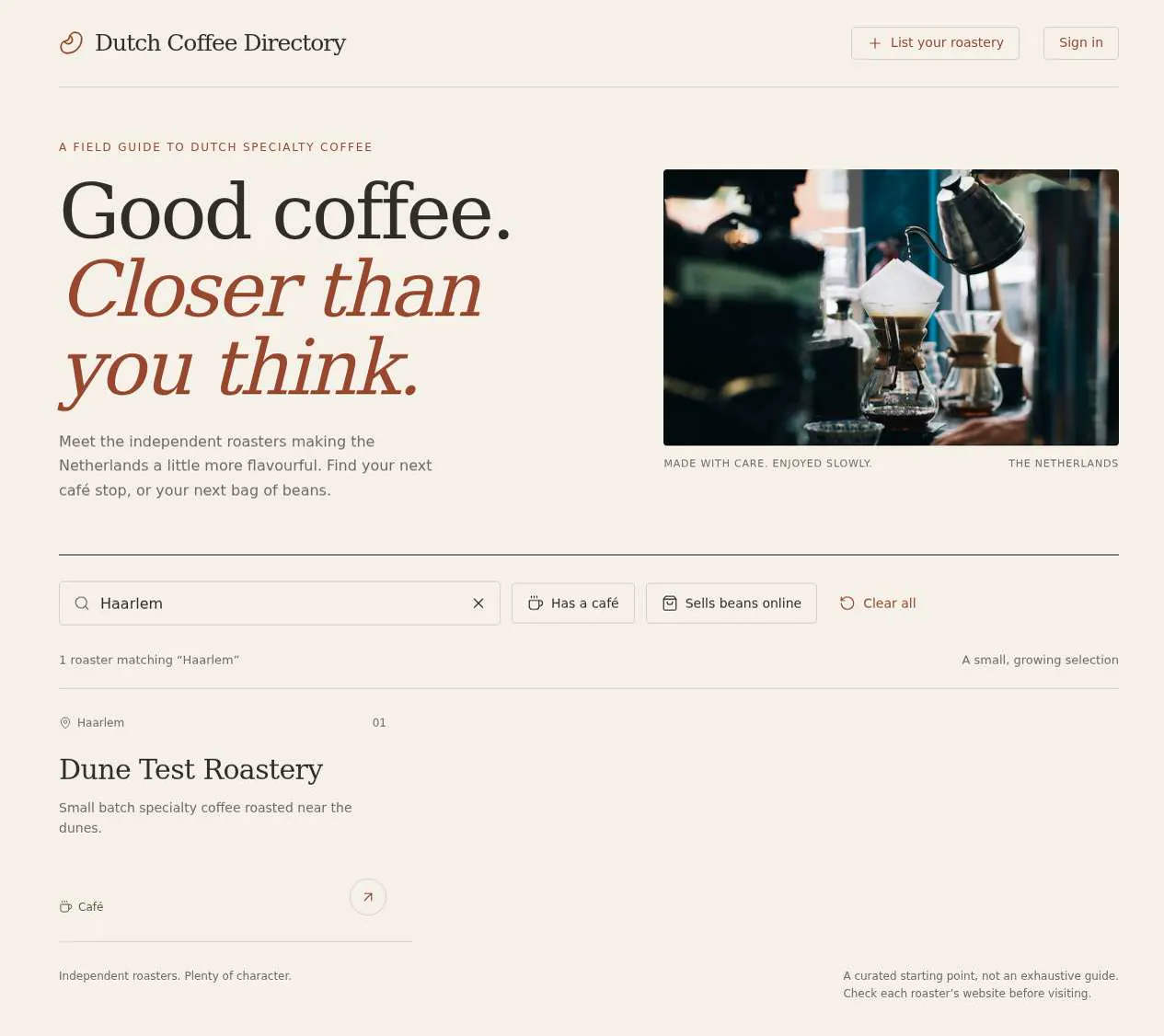
- Pass: The admin approves a submission from the queue and it appears in the public directory · The admin clicked Approve listing on Dune Test Roasters in the queue; signed out, it then showed in the directory in Haarlem.
- Pass: A signed-out visitor or a signed-in non-admin cannot open the approval queue · A signed-in non-admin opening the approval queue saw 'No access'; signed out, it went to sign-in.
- Pass: A listing submitted by a member becomes visible to visitors only after the admin approves it · A submitted roastery didn't show for a Haarlem search until the admin approved it; then it did.
Run
- Run: 11 Nov 2026 · vibe prompts
- Builder: the Framer 4 agent on GPT 6.1 Sol, in a new project
- Customer: an AI agent playing the owner of Roast Register, writing in the Tweak style
- Agent steps: 29 tool steps
- Prompt limit: 40 per app
- Cost: $0.56 for the builder, $0.13 for the judge
- Judge: an AI agent that tried each check in the live preview with a browser, signed out and signed in with each test account
Listings site
Every check passed: search, filters, submissions and an approval queue.
- Result: Pass
- Checks: 7 of 7 pass
- Prompts: 3; every check passed after prompt 3
- Time: 3m37s in total
- Spent: $0.69
Prompt 1 of 3
I want visitors to browse a directory of specialty coffee roasters in the Netherlands without having to sign in. They should be able to search by city and see just the roasters there, then narrow things down with filters like “has a café” and “sells beans online.” Searching and filtering should work together, with an easy way to clear them and a friendly message if nothing matches. Each listing should make the roaster’s name, city, and those features easy to spot. Give it a warm, earthy, thoughtfully crafted feel—more indie coffee magazine than Yelp.
Built the directory with combined city search and filters, easy clearing,
- Pass: A signed-out visitor searches by a city and the list narrows to listings there · Signed out, typed Amsterdam into Search by city; six roasters narrowed to Friedhats, DAK and LOT61.
- Pass: Filtering by a feature shows only listings that have it · Clicked Has a café; Amsterdam narrowed to Friedhats and LOT61, and with no city four café listings showed.
Prompt 2 of 3
Now I’d like signed-in roasters to be able to submit their own listing. Give them a welcoming form for their roaster’s name, city, a short description, website, and whether they have a café or sell beans online. After they submit, clearly tell them their listing is waiting for my review. Keep it out of the public directory, including search and filter results, until I approve it. Keep the same warm, earthy magazine feel.
Added the submission form and private review page,
- Pass: A signed-in member submits a listing and is told it is waiting for review · Signed in, submitted Amber Test Roastery in Delft and was told it is waiting for review; after a reload it showed Awaiting review.
- Pass: A submitted listing does not appear publicly before approval · Signed out, searching Delft found nothing and only the six original roasters showed before approval.
Prompt 3 of 3
I’d like to finish the review process now. Give me a private queue where I can look over submitted roasters and approve them. Once I approve a listing, it should appear in the public directory and show up in the right city searches and filters. Only my admin account should be able to open the queue—not signed-out visitors or other signed-in roasters, even if they have the page link. Keep the same warm, earthy feel. Please let me know how to identify my account as the admin.
The private review queue lets admins approve roasters, making them
- Pass: The admin approves a submission from the queue and it appears in the public directory · The admin clicked Approve listing on Dune Test Roasters in the queue; signed out, it then showed in the directory in Haarlem.
- Pass: A signed-out visitor or a signed-in non-admin cannot open the approval queue · A signed-in non-admin opening the approval queue saw 'No access'; signed out, it went to sign-in.
- Pass: A listing submitted by a member becomes visible to visitors only after the admin approves it · A submitted roastery didn't show for a Haarlem search until the admin approved it; then it did.
Listings site
Every check passed: search, filters, submissions and an approval queue.
- Result: Pass
- Checks: 7 of 7 pass
- Prompts: 3; every check passed after prompt 3
- Time: 3m37s in total
- Spent: $0.69
Curated directory with submissions
Test accounts:
- Member: member@example.com
- Admin: admin@example.com
Roast Register is the guide to specialty coffee roasters in the United Kingdom, made by one coffee nerd who cares. Visitors find roasters by city and filter by what matters to them, such as a café to sit in or beans sold online. Roasters submit their own listing, and the editor approves every listing before it goes public.
The app has three roles.
- Visitors: browse, search by city, filter and read roaster pages. They never sign in.
- Roasters: sign in, submit a listing for their roastery and follow its review status. Every new listing waits for the editor's approval.
- The editor: (the app's admin account) reviews the queue of new listings and corrections, approves or rejects listings with a reason, and edits or unpublishes any listing.
On first open, Roast Register holds about 40 real UK specialty roasters across at least 12 cities, each with real details from the roaster's own website.
Nothing is broken and everything works. Every button, link and form does what it says with real data. No page shows placeholder text, sample images, "coming soon", "not set up yet", lorem ipsum or a link to nowhere.
These are not part of Roast Register: ratings and reviews, comments, selling coffee or taking payments, events, a blog or magazine articles, roasters outside the United Kingdom, a map of roasters, roasters claiming an existing listing or editing a live one, Editor's picks, the editor changing the list of features, sorting by distance, an "Open now" filter, and anything shown publicly before the editor approves it.
Brand and visual direction
Roast Register is for people who care about coffee: home brewers looking for a new roaster, people visiting a city who want a proper flat white, and café owners looking for beans. They read Standart and Sprudge, notice typography, and dislike review-site clutter. Roasters are small, independent businesses that want to be shown well and accurately. Name and voice: The guide is called Roast Register, because it reads like a register of roasters: a carefully kept, printed-style record of who roasts what and where. Its line is "Specialty coffee roasters in the United Kingdom." The copy reads like a good indie coffee magazine: warm, knowledgeable, unhurried, never salesy. "Roasting light Ethiopian and Kenyan lots since 2016." "Café with a view of the roaster." It uses no exclamation marks, emoji, star ratings or hype words such as "best ever", "ultimate", "supercharge" or "unleash". Visual direction: Roast Register looks like an independent print magazine: an earthy paper palette, a literary serif, and photography of real roasteries given room to breathe.
- Colour: a warm unbleached paper page (about #F3EDE2), a dark roast brown for text (about #2B2118), a soft clay for hairlines and tags (about #D8CBB6), and one accent, a deep olive (about #5E6B2A), used only for the main action on a screen, active filters and focus states. There are no gradients, glows, glass effects or purple-blue palettes.
- Type: Spectral for display headings, roaster names and pull quotes, with large and generous headings; Archivo for interface text, filters, labels and details. Body text is 16 to 17 px with a comfortable line length of about 70 characters on roaster pages.
- Shape: small radii (2 to 4 px), 1 px hairline rules like a printed page, and generous margins. Photos keep a 3:2 ratio with no border. Feature tags are small outlined labels in Archivo.
- Layout: a 12-column grid with a maximum content width of about 1200 px. Listing grids have 3 columns on desktop, 2 on tablet and 1 on phone. Roaster pages use a magazine layout: a large photo, then text in a readable column with a details sidebar on desktop. The header holds the wordmark, Roasters, Cities, "List your roastery" and Sign in, or the roaster's menu once signed in.
- Imagery: only real photos of the roasteries, cafés and coffee, from the roaster's own website or uploaded by the roaster, and real logos. A listing without a photo shows its name set large in Spectral on a clay block. There are no stock photos, 3D renders, AI illustrations or coffee-bean clip art.
- Motion: short (150 to 200 ms) fades only. Nothing bounces.
- Every page works at 390 px wide with no horizontal scrolling, and every control is usable by keyboard with a visible focus ring.
Pages beyond the product: The footer links to real pages with real content: About (who makes Roast Register and why), What we list (what counts as a specialty roaster, and how review works), List your roastery (how roasters submit a listing), and Privacy. A branded not-found page links back to the roasters.
Checks:
- Every page shows the Roast Register wordmark and the same header and footer, and every footer link opens a page with real content
- The design follows the direction above: unbleached paper background, roast brown text, one olive accent, Spectral headings with Archivo interface text, hairline rules and real roastery photos, with no gradients, star ratings or stock imagery
- The home page, a roaster page and the submission form have no horizontal scrolling at phone width, and their main actions stay reachable
- Opening a made-up address shows a branded not-found page with a way back to the roasters
Roasters: what Roast Register starts with
On first open, Roast Register holds about 40 real specialty coffee roasters in the United Kingdom, sourced by the agent from each roaster's own website, across at least 12 cities, such as London, Bristol, Manchester, Leeds, Sheffield, Birmingham, Newcastle upon Tyne, Edinburgh, Glasgow, Brighton, Bath and Cardiff. London has the most, about 8 to 10, including roasters such as Square Mile Coffee Roasters, Workshop Coffee, Assembly Coffee, Dark Arts Coffee and Caravan. Bristol, Manchester, Edinburgh and Glasgow have about 3 to 5 each, such as Extract Coffee Roasters and Clifton Coffee Roasters in Bristol, and Dear Green Coffee in Glasgow. Every other city has at least 2. Each listing keeps its real details: name, city, street address, a short description written in Roast Register's voice from what the roaster says about itself, its website, Instagram, its features, café opening hours where it has a café, the year it started where known, and one to four real photos and its logo. Each links to the roaster's real website. No roaster, address or website is made up. Features: Every listing has its features from a fixed list: Has a café, Sells beans online, Coffee subscription, Wholesale for cafés, Workshops or cuppings, Organic coffee and Decaf available. Every feature is used by at least 4 listings, and both Has a café and Sells beans online by at least 15. Starting work: The editor's queue holds 3 pending submissions and 1 correction, so the review screens show real work from the first open. These come from test roaster accounts and are clearly theirs, not real roasters.
Checks:
- The roasters list shows about 40 roasters in at least 12 cities, and every feature filter returns at least 4
- Ten listings picked at random each have a real address, a working link to the roaster's own website, a description and at least one real photo or logo
- Square Mile Coffee Roasters and Workshop Coffee appear under London, and Extract Coffee Roasters under Bristol, each with its real website
- No listing, photo or text looks like filler: no sample names, repeated photos, grey boxes or lorem ipsum
Visitor: browsing and searching roasters
The home page is the roasters list. At the top, a short heading and introduction give the number of roasters and cities. Below that come the search and filters, then the grid. Cards: Each card shows a 3:2 photo, the roaster's name, its city, and its features as small tags. Clicking the card opens the roaster's page. Search by city: A "Search by city" box suggests cities as the visitor types, tolerating partial words and case ("lond", "newcastle" for Newcastle upon Tyne). Choosing a city shows only roasters there. Searching also matches roaster names, so typing "Square Mile" finds it. Each city has its own page with a heading ("Coffee roasters in Bristol"), a short introduction and the same filters, linked from Cities in the header. Filters: Feature filters (Has a café, Sells beans online, and the rest) can be combined, and a listing must have every chosen feature. Search and filters work together. Active filters show as removable chips with a "Clear all" link, and the count of results updates. Sorting: A to Z (the default) and Newest on Roast Register. Shareable addresses: The city, filters, sort and search terms are all in the page's address. Opening it in a new window shows the same results, and Back and Forward step through changes. Empty results: When nothing matches, the page says so in Roast Register's voice ("No roasters in Inverness with a café yet"), and offers to clear the filters.
Checks:
- A signed-out visitor types London in Search by city and the list shows only London roasters, with the count
- Turning on Has a café with London chosen shows only London roasters with a café, and adding Sells beans online narrows it further
- Removing a filter chip widens the results again, and Clear all shows every roaster
- Copying the address after choosing a city and two filters, and opening it in a new signed-out window, shows the same results
- A city and filter combination with no matches shows the friendly empty state with a way to clear filters, not a blank grid
- A city page shows its own heading and introduction, and only that city's roasters
Visitor: a roaster's page
Each roaster has its own page at a readable address such as /roasters/square-mile-coffee-roasters. Top: A large photo, the roaster's name in Spectral, its city, the year it started, and its features as tags linking to the filtered list. Story: The description in a readable column. Details: In a sidebar on desktop and below the story on phone: the street address with a Directions link, café opening hours with today highlighted and "Open now" or "Closed" (in UK time) when it has a café, the website (opening the roaster's site), "Shop beans" (opening its web shop) when it sells online, and Instagram. Photos: Up to four photos in a row. Clicking one opens it large, arrow keys move between them, and Escape closes it. Nearby: "More roasters in {city}" with up to 3 others from the same city, never the current one. Suggest a correction: A small link opens a form where anyone can say what is wrong (closed for good, moved, wrong hours, other) with details and an optional email. It goes to the editor's queue and the visitor sees a thank-you.
Checks:
- A roaster's page shows its photo, description, address with a Directions link, features, website link and, when it has a café, its hours with today highlighted
- The website and Shop beans links open the roaster's real pages
- "More roasters in {city}" shows other roasters from the same city and not the current one
- A signed-out visitor sends a correction and sees a confirmation, and it appears in the editor's queue
Roaster: submitting a new listing
"List your roastery" leads to a page that explains how it works: sign in, submit your listing, the editor reviews it, usually within a few days, and you get an email either way. Signing in uses the app's sign-in. The form: One welcoming form in sections.
- About:: roastery name (required, up to 60 characters), city (required, chosen from UK cities with suggestions), street address with postcode (required, checked to be a real address), year started, and a description (required, 80 to 800 characters) with a note on what reads well.
- Features:: the feature list as checkboxes, and café opening hours per day when Has a café is ticked.
- Links:: website (required, a full https address), web shop, and Instagram handle.
- Photos:: a logo and one to four photos, by dragging or choosing files (JPG, PNG or WebP, up to 8 MB each), each with a 3:2 crop preview and a way to remove it.
Before submitting, the form checks whether a listing with the same name or website already exists, and if so says it is already listed and links to it instead of submitting a duplicate. Errors appear next to each field in plain words, and nothing is lost when one is fixed. After submitting: The roaster sees "Thanks. Your listing is waiting for review", and My listing shows the status Waiting for review. The listing does not appear anywhere public: not in the list, search, filters, city pages or by its address. The published app emails the roaster from its own address, with the app's built-in email sending: subject "We received your listing for {name}", saying what happens next. The editor's notification address receives "New listing to review: {name}, {city}" with a link to the queue. Both really arrive.
Checks:
- A signed-in member submits a complete listing with a photo and is told it is waiting for review; after a reload My listing still shows Waiting for review
- Signed out, searching the listing's city, filtering and the listing's address do not show the submitted listing
- The member's inbox receives the "We received your listing" email, and the editor's inbox receives the "New listing to review" email
- Submitting without a name, with a description under 80 characters or with a website that is not a full https address is refused with a message next to each problem, and nothing typed is lost
- Submitting a roastery whose website matches an existing listing says it is already listed and links to it
Rejected: A rejected submission shows the editor's reason on My listing, and the roaster can fix it with the same form and send it again. A roaster can only edit their own submission. Opening the edit address of another roaster's listing shows "not allowed" and changes nothing.
Checks:
- A rejected submission shows the editor's reason on My listing, and the member can edit and resubmit it
- Opening the edit page of a listing that belongs to someone else does not let the member change it
Editor: the review queue
The editor area is open only to the admin account. A signed-out visitor who opens its address is sent to sign-in, and any other signed-in account sees "Only the editor can open this", even with the page link. Queue: Tabs for New listings and Corrections, each with a count, oldest first. Opening a new listing shows it as it will appear publicly, with the submitter's email. Decisions: Approve publishes it at once: the listing appears in the list, its city page, search and filters. Reject asks for a reason the roaster sees. The editor can fix small things (a typo, a photo crop) before approving. Each decision sends the roaster an email: "{name} is now live on Roast Register" with a link to the page, or "About your listing for {name}" with the reason. Corrections are marked as handled after the editor updates the listing or dismisses them. Empty queue: An empty tab says nothing is waiting.
Checks:
- The editor approves a pending submission from the queue; signed out, it then appears in its city's search, matching filters and at its own address
- Approving sends the roaster the "is now live" email with a link to the listing, and rejecting with a reason sends the reason
- A signed-out visitor is sent to sign-in and a signed-in non-admin member sees that only the editor can open the queue, even with the page link
Editor: managing listings
Every listing with search and status filters (Live, Waiting, Rejected, Unpublished). The editor can edit any listing, unpublish one with a reason (it disappears from every public place and its address says it is no longer listed), and republish it.
Checks:
- Unpublishing a listing removes it from the list, search and city page for a signed-out visitor, and its address says it is no longer listed
- Republishing an unpublished listing shows it publicly again
Speed and findability
Roast Register stays quick with every listing. The first screen of the list shows its cards as soon as the page loads, without waiting for scripts. Photos are resized copies, load lazily below the fold, and keep their space reserved, so nothing jumps. Search and filters update the results within half a second. Every public page has its own title and description. Roaster pages are titled "{Name}, specialty coffee roaster in {City} | Roast Register", with their photo as the share image and their address and café hours in the page's details for search engines. City pages are titled "Coffee roasters in {City} | Roast Register". A sitemap lists every live roaster and city. Pending, rejected and unpublished listings are left out and are not shown to search engines.
Checks:
- The home page shows its first roaster cards within about 2 seconds, and scrolling the full list does not shift the layout
- Choosing a city or filter updates the results within about half a second
- A roaster page has a title with its name and city, a description and a share image, and the sitemap lists live roasters but not pending or unpublished ones
Everything works
These checks apply to every screen above, for signed-out visitors, roasters (the member) and the editor (the admin). The number before each check is its weight: 3 means the app fails if the check fails, 2 a serious defect, 1 a defect worth noting.
For every app:
- Must pass: Every feature this spec describes is there, and each fix the agent claims holds when the original steps are repeated
- Serious: At phone (390 px), tablet (810 px) and desktop (1,200 px and up), the roasters list, a city page, a roaster page and its photo viewer, the submission form, My listing, the editor's queue and the listings view show nothing cut off, no sideways scrolling, a reachable header and menu, and inputs of at least 16 px
- Serious: Every card, feature tag, Cities link, "More roasters in {city}", Directions, website, Shop beans, Instagram and footer link goes to the right place; reloading a roaster page, a city page, a filtered list, My listing or the editor's queue on the live address works; a made-up address shows the branded not-found page; Back and Forward step through search and filter changes
- Minor: Roaster photos and logos load at 3:2 without stretching or breaking, a listing without a photo shows its name on a clay block, and pasting a roaster page's live link into a chat app shows its name and photo, not a builder default
- Serious: Later work did not break earlier work: after submissions and the editor's tools are built, browsing, search, filters, roaster pages, the 40 starting roasters and the 4 starting queue items still work and are unchanged
- Minor: After each prompt, the agent's reply says honestly what changed and what it could not verify (including anything that still needs a key or account), is never empty, never presents preview-only as done, and never claims a fix that is not there in the live app
For this app:
- Must pass: Every flow works end to end with fresh input, checked where it lands: a member's submission appears in the editor's queue and nowhere public; the editor's approval puts it in the list, its city page, search and filters for a signed-out visitor; a rejection reason appears on the member's My listing; a visitor's correction appears under Corrections; unpublishing removes a listing from every public place
- Must pass: Submitted, resubmitted and edited listings, uploaded photos, approvals, rejection reasons, handled corrections, unpublishing and republishing stay as saved after a reload and in another browser, for the people who should see them, and "Your listing is waiting for review" always matches a listing on My listing and in the queue
- Must pass: The member reaches the submission form and only their own My listing and edit page; the queue and listings view send a signed-out visitor to sign-in and show the member "Only the editor can open this", even with the page link; a pending, rejected or unpublished listing's address and another roaster's edit address show nothing private, and the member cannot approve, edit others' listings or make themselves editor by sending the request directly
- Must pass: On the published address, a roaster signs up, confirms by email, signs in, reloads, signs out and resets their password, and every link and redirect lands on the live domain; no browsing page asks a visitor to sign in
- Serious: "We received your listing for {name}", "{name} is now live on Roast Register", "About your listing for {name}" and the editor's "New listing to review: {name}, {city}" each arrive in a real inbox, not spam, from the app's address, with the listing's name, the editor's reason where there is one, a working link, and plain text that reads cleanly
- Serious: The published app behaves like the preview: search, filters, sign-in, submission with photos, every email and every editor action work on the live address, the sitemap uses the live domain, and no live page mentions "preview"
- Serious: Empty states (a city and filter with no roasters, such as "No roasters in Inverness with a café yet", an empty queue tab, a member with no listing yet), loading states and errors (a failed upload, an address that cannot be found) are clear and in plain words, with no technical or setup text
- Serious: The submission form accepts a logo and one to four photos as JPG, PNG or WebP up to 8 MB each with a 3:2 crop preview, refuses other types and larger files with a clear message, lets a photo be removed, and the photos show on the roaster page once approved
- Serious: As a signed-out visitor, the page source and network requests, including the list's data and the sitemap, contain no secret keys, no pending, rejected or unpublished listings, and no submitter or correction emails; the submission and correction forms link to Privacy
- Minor: The submission form refuses an empty name, a description under 80 or over 800 characters, a website that is not a full https address and an address that is not real with a message next to each field, keeping everything typed; submitting twice in a row, or a roastery whose name or website is already listed, creates no duplicate; the correction form refuses a malformed email
- Minor: Search by city finds "lond", "newcastle" and "Square Mile", shows the empty state for a city with no roasters, combines Has a café with Sells beans online correctly, sorts A to Z and Newest, and a reload or copied address keeps the city, filters, sort and search; the editor's search and status filters find the right listings
Done when
Checks:
- A signed-out visitor can find roasters by city, features and search, and open a roaster's page with real details and working links
- A roaster can sign in, submit a listing, see that it waits for review, and receive an email when the editor decides
- Nothing a roaster submits or changes appears publicly until the editor approves it, and only the editor can open the review queue
- With about 40 real roasters, every page loads fast, looks like an independent coffee magazine in Roast Register's own brand, and nowhere shows a placeholder, dead link or "not set up" state
Listings site
Every check passed: search, filters, submissions and an approval queue.
- Result: Pass
- Checks: 7 of 7 pass
- Prompts: 3; every check passed after prompt 3
- Time: 3m37s in total
- Spent: $0.69
Roast Register: the simulated customer
An AI agent plays the owner of Roast Register and writes every prompt. It reads the spec and this file, never the Framer 4 agent's code.
- Style: Tweak.
Persona and why it fits
Tweak. A directory is visual and browsable, so problems show at a glance (empty cards, a filter that does nothing). That suits someone who reacts to what they see in a few words.
Prompt length and tone
- Length: 4 to 20 words, typically 6 to 10. One idea per prompt.
- Tone: Casual and terse, often lowercase, no greeting, the occasional typo. Names what they see, not how to fix it.
- Language: English only.
Example prompts for this app:
- "make a guide to specialty coffee roasters in the uk, searchable by city"
- "cafe to sit in filter does nothing"
- "where do roasters submit their own listing?"
Style mix
Tweak for 76% of prompts, Describe 18%, Specify 5%, Brief 0.5%.
Switches come early and cluster around breakage: a failed fix or an unrequested change makes the next prompt likelier to be longer and more exact.
How they choose the next prompt
One thing per prompt, the most visible one: a broken control or page first, then a missing feature from the spec, then something that looks off. They name it in a few words and let the agent work out the fix. Order of attention for this app:
- Anything broken: a control that does nothing, a page that errors, a broken image or link, a layout broken on phone, a claimed change that isn't there.
- Search by city and the feature filters (such as a café to sit in or beans sold online).
- A roaster submitting a listing and following its review status.
- The editor's approval queue, with nothing public before approval.
- Everything else in the spec, including the brand and copy rules, in spec order.
How they react to breakage
- Reports it in one line, close to what they saw: "still doesn't open", "pic is stretched on my phone".
- If the same problem survives two fixes, they switch to a Describe-style prompt that says where it happens and what they expected (the 18% Describe share mostly comes from here).
- If an edit changed something they didn't ask for, they send one guarded Specify-style order ("only fix X, change nothing else"), then go back to short lines.
- If the agent says it's fixed and it isn't, they say so plainly: "you said it was fixed, it isn't".
Stop rule
- They keep prompting until the judge says every check in the spec is met, or until prompt 40, whichever comes first.
- The persona shapes how they prompt and react, never when they stop: no giving up, no stopping early because it looks good enough.
- The judge also grades whether the agent's replies are honest (claimed changes match the app), so the simulated user reports false claims as they see them and doesn't take a claim on trust.