Lead quiz
The Dutch heat-pump quiz, estimate and leads inbox work; the quote email could not be checked.
- Result: Fail
- Checks: 6 of 7 pass, 1 not checked
- Prompts: 4
- Time: 5m51s in total
- Spent: $1.12
Checks
- Pass: A signed-out visitor answers every question and sees a recommended product with a rough price · Signed out, answered all five questions and got a heat pump plus solar panels at €20,500–€29,000, marked as a first estimate.
- Pass: Different answers can lead to a different recommendation or price · Clicked Antwoorden aanpassen and changed insulation from good to partial; the advice changed to a hybrid heat pump plus solar at €12,000–€17,500.
- Pass: Leaving an email saves the lead and shows a confirmation · Finished the quiz, entered an email and saw a saved confirmation that stayed after a reload; the admin saw the email, answers and estimate.
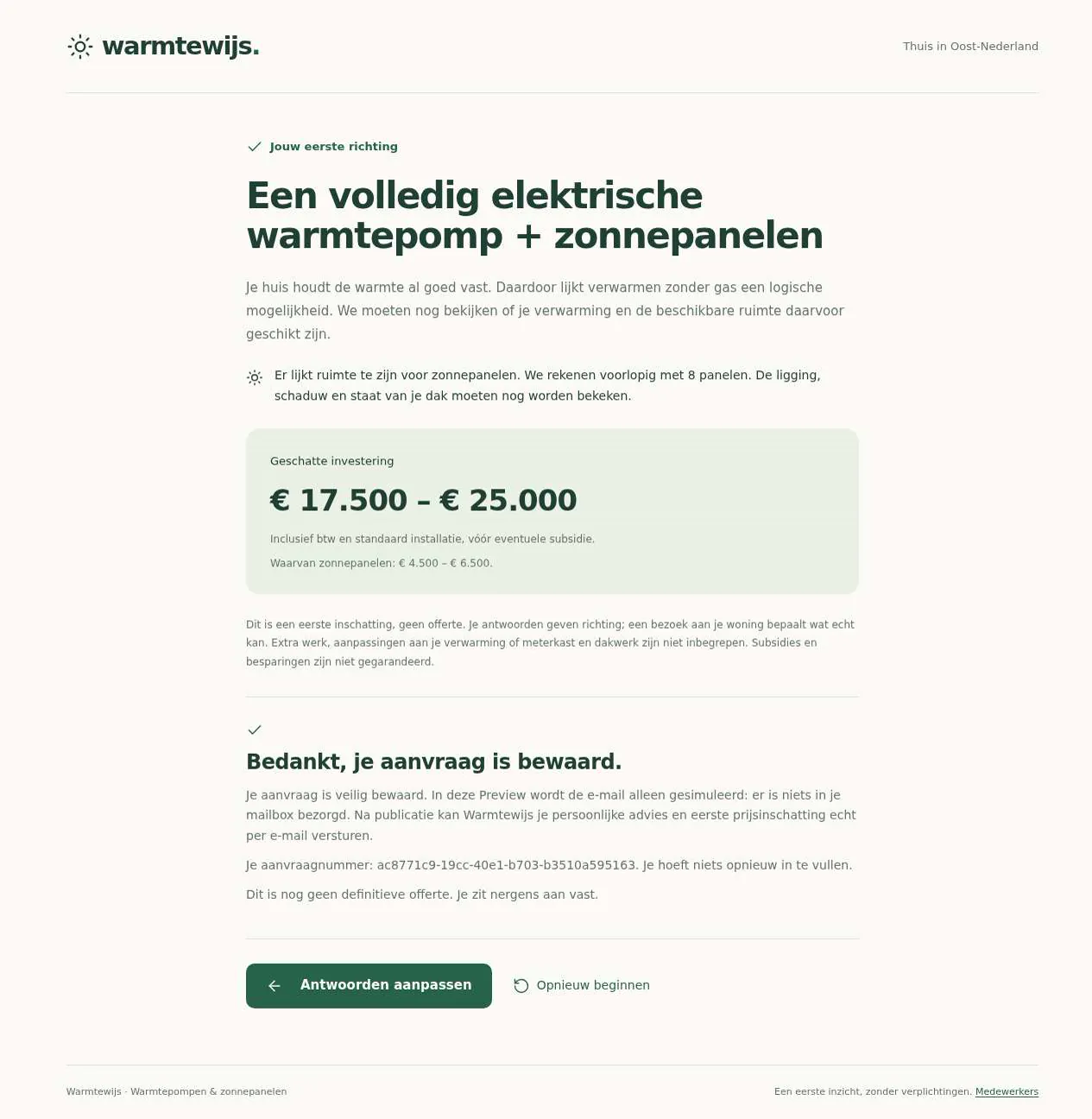
- Not checked: The visitor receives the quote by email, with their recommendation and estimate · After sending, the page said email is only simulated in the preview, and the admin's record said 'niet bezorgd' (not delivered).
- Pass: The company's admin sees the new lead with every answer and the estimate · The admin's inbox showed the new lead with all five answers, the heat pump plus solar advice and €20,500–€29,000, after a reload.
- Pass: A signed-out visitor or a signed-in non-admin cannot open the leads inbox · Signed out, opening the leads inbox went to sign-in; a signed-in non-admin got No access.
- Pass: A lead submitted by a visitor appears in the admin's inbox with the same answers and estimate the visitor saw · A visitor's quiz showed €17,500–€25,000; the admin's inbox showed the same five answers, advice and estimate after a reload.
Run
- Run: 11 Nov 2026 · vibe prompts
- Builder: the Framer 4 agent on GPT 6.1 Sol, in a new project
- Customer: an AI agent playing the owner of Heatwise, writing in the Describe style
- Agent steps: 40 tool steps
- Prompt limit: 40 per app
- Cost: $0.93 for the builder, $0.19 for the judge
- Judge: an AI agent that tried each check in the live preview with a browser, signed in with each test account
Lead quiz
The Dutch heat-pump quiz, estimate and leads inbox work; the quote email could not be checked.
- Result: Fail
- Checks: 6 of 7 pass, 1 not checked
- Prompts: 4
- Time: 5m51s in total
- Spent: $1.12
Prompt 1 of 4
I'd like to start with the quiz for Warmtewijs. We install heat pumps and solar in the east of the Netherlands, and homeowners often feel overwhelmed or worried about the cost. Make it feel bright, reassuring and human, in Dutch, without sales talk or technical jargon. Visitors should be able to start without signing in and answer a handful of simple questions about their home, one at a time—for example their home type, insulation, current heating and whether they have space for solar panels. Let them go back if they need to change an answer. At the end, show which heat pump or solar option seems to fit their situation, a short plain-language explanation, and a rough price in euros. The advice and price should genuinely depend on their answers, rather than everyone seeing the same result. Make clear that this is an initial estimate, not a final quote. For now, let's focus on getting this quiz and recommendation working; collecting contact details can come later.
De Warmtewijs-keuzehulp werkt zonder account, met vijf vragen en de
- Pass: A signed-out visitor answers every question and sees a recommended product with a rough price · Signed out, answered all five questions and got a heat pump plus solar panels at €20,500–€29,000, marked as a first estimate.
- Pass: Different answers can lead to a different recommendation or price · Clicked Antwoorden aanpassen and changed insulation from good to partial; the advice changed to a hybrid heat pump plus solar at €12,000–€17,500.
Prompt 2 of 4
The quiz is in place; now I’d like visitors to be able to leave their email at the end to receive their full quote. Keep this in Dutch and just as friendly and reassuring as the quiz, with no account needed. Make clear what they’ll receive and that the price is still an initial estimate, not a binding offer. When someone submits a valid email address, save their details together with their quiz answers, recommendation and estimated price so we don’t lose the enquiry. Show a clear thank-you message once it’s saved, and actually send them an email with their personalised recommendation, estimated price in euros and a brief explanation of why it suits their home. Please don’t just show a confirmation without sending the email.
De aanvraag wordt nu zonder account opgeslagen met e-mailadres, antwoorden, advies en
Prompt 3 of 4
I tried leaving member@example.com after completing the quiz. I saw a friendly Dutch thank-you saying my enquiry was saved, but after reloading it disappeared, and I couldn’t find any saved enquiry. Please make sure submissions are genuinely kept, with the email address, quiz answers, recommendation and estimated price—not just shown in a thank-you message. Our staff need to be able to retrieve them privately; when I tried /admin, I got “Page not found.” Visitors should still need no account. Please also make sure the visitor actually receives their personalised quote email, including the recommendation, why it suits their home and the estimated price in euros, clearly described as an initial estimate rather than a binding offer. If delivery is only simulated here, please be clear about that rather than saying it was sent, and explain what’s still needed for real delivery. Keep the confirmation and email friendly, reassuring and in Dutch.
Aanvragen blijven nu bewaard met e-mailadres, antwoorden, advies en richtprijs.
- Pass: Leaving an email saves the lead and shows a confirmation · Finished the quiz, entered an email and saw a saved confirmation that stayed after a reload; the admin saw the email, answers and estimate.
- Not checked: The visitor receives the quote by email, with their recommendation and estimate · After sending, the page said email is only simulated in the preview, and the admin's record said 'niet bezorgd' (not delivered).
Prompt 4 of 4
Now I’d like to focus on our staff’s private leads inbox. As a Warmtewijs admin, I want to open Aanvragen and see every saved enquiry, including the visitor’s email address, every quiz question and answer, their recommended system and the estimated price in euros. I should be able to open a lead and read the full details, including new enquiries that come in through the quiz. Please make sure this is genuinely private: someone who is signed out, or signed in with an ordinary non-admin account, must not be able to see the inbox or any lead details, even if they open the address directly. Keep the inbox clear and in Dutch, and let me know how our staff can get admin access.
Aanvragen toont alle opgeslagen aanvragen, met e-mailadres, alle
- Pass: The company's admin sees the new lead with every answer and the estimate · The admin's inbox showed the new lead with all five answers, the heat pump plus solar advice and €20,500–€29,000, after a reload.
- Pass: A signed-out visitor or a signed-in non-admin cannot open the leads inbox · Signed out, opening the leads inbox went to sign-in; a signed-in non-admin got No access.
- Pass: A lead submitted by a visitor appears in the admin's inbox with the same answers and estimate the visitor saw · A visitor's quiz showed €17,500–€25,000; the admin's inbox showed the same five answers, advice and estimate after a reload.
Lead quiz
The Dutch heat-pump quiz, estimate and leads inbox work; the quote email could not be checked.
- Result: Fail
- Checks: 6 of 7 pass, 1 not checked
- Prompts: 4
- Time: 5m51s in total
- Spent: $1.12
Product-finder quiz with lead capture
Test accounts:
- Admin: admin@example.com
- Member: member@example.com
Heatwise is a team of 20 people based in Shrewsbury who install heat pumps and solar panels across Shropshire, Herefordshire and mid Wales. This app is the "Which system suits my home?" quiz on their site, the kind Octopus Energy has. A homeowner answers a few simple questions about their house, one at a time, sees which system fits and a rough price in pounds, and leaves their email address to receive full personal advice by email. Heatwise staff see every enquiry with all its answers in a private inbox. Homeowners find heat pumps confusing and worry about the cost, so every screen is reassuring, human, bright and optimistic, never salesy or technical. The whole app is in English.
The app has two roles, plus anyone else who happens to have an account.
- Homeowners: signed-out visitors. They take the quiz, change answers, see their advice and price estimate, and leave their details for the full advice by email. They never need an account.
- Heatwise staff: use the admin account. They sign in to a private area with the enquiries inbox (Enquiries), each enquiry's full answers and estimate, a status and notes per enquiry, and the price list the estimates are based on.
- Anyone else with an account: (for example the member test user) sees only what homeowners see, and is refused in the staff area.
On first open, the quiz has its seven questions and a price list based on Heatwise's real price ranges and the current Boiler Upgrade Scheme grant amounts, and the inbox holds about 60 enquiries from the past eight weeks, so the inbox and its filters show real content.
Nothing is broken and everything works. Every button, link and form does what it says with real data. No page shows placeholder text, sample images, "coming soon", "not set up yet", lorem ipsum or a link to nowhere.
These are not part of Heatwise: online ordering or payment, booking a home visit in a calendar, customer accounts, a full Energy Performance Certificate calculation, financing or loan applications, a chat assistant, quiz usage figures or funnel charts, exporting enquiries to a spreadsheet, a settings page, and quizzes for other products such as batteries or charging points.
Brand and visual direction
The quiz is for homeowners in Shropshire, Herefordshire and Powys, mostly between 35 and 70, in terraced houses, semi-detached houses, bungalows and farmhouses. They have heard heat pumps are the future but do not know whether one suits their house, and fear a large bill or a pushy salesperson. They should leave feeling that their house is understood, the numbers are honest, and talking to Heatwise is easy. Name and voice: The company is called Heatwise, with the line "Warm homes, without the hassle". The copy uses "you", warmly and plainly, like a friendly installer at the kitchen table: "What kind of home do you have?", "This suits your home", "Send me the full advice". Technical words are avoided or explained in one line ("A hybrid heat pump works together with your gas boiler"). No exclamation marks, emoji, pressure or hype ("now or never", "limited time", "supercharge", "unleash"), and savings are never promised as certain. Visual direction: A sunny, well-designed energy company: light, friendly, clear numbers, room to breathe.
- Colour: a warm white page (about #FFFDF8), sunlight-yellow panels (about #FFF1C9) for prices and highlights, deep pine text (about #183A2C) and pale sand hairlines (about #ECE4D2). One accent, a fresh leaf green (about #1F7A47) with white text, is used only for the main action on a screen (Next, See my advice, Send me the full advice, Save), the selected answer, the progress bar and focus rings. No gradients, glows, glass effects or purple-blue palettes.
- Type: Bricolage Grotesque for headings, questions and prices, with Epilogue for body text and answers. Questions are about 32 px on desktop and 26 px on phone, body text 17 px, and prices use tabular figures and UK formatting ("£12,000 to £17,500").
- Shape: 14 px corners on answer cards and buttons, 1 px borders instead of shadows, and answer cards at least 56 px high and clickable as a whole.
- Layout: the quiz is one centred column up to about 680 px, one question per screen, with a progress bar and "Question 3 of 7" above and Back and Next below; answer cards in two columns on desktop and tablet, one on phone. The result page widens to about 1040 px, advice left and form right on desktop, stacked on tablet and phone. The staff area goes up to about 1280 px.
- Imagery: flat line drawings in pine and leaf green of each house type, a heat pump and solar panels, on answer cards and the result. No stock photos, 3D renders, AI illustrations or emoji.
- Motion: short (150 to 200 ms) slides between questions; reduced motion turns them into simple swaps.
- Every page works at 390 px wide with no horizontal scrolling, and the whole quiz works by keyboard: arrow keys move between answers, Enter chooses, and a visible focus ring shows where you are.
Pages beyond the product: The footer links to real pages with real content: About Heatwise (the team of 20 and where they work), Where we work (Shropshire, Telford and Wrekin, Herefordshire and Powys, with the larger towns), Grants (what the Boiler Upgrade Scheme is, who can get it in England and Wales, the current amounts and a link to the scheme's page on gov.uk), How we calculate (how the estimate is made and why it is not a quote), Privacy and Contact. A branded not-found page says "We couldn't find this page" and links back to the quiz.
Checks:
- Every page shows the Heatwise wordmark and the same header and footer, and every footer link opens a page with real content in English, not a placeholder
- The design follows the direction above: warm white background, pine text, sunlight-yellow price panels, one leaf-green accent for main actions, Bricolage Grotesque headings with Epilogue body text, rounded answer cards with hairline borders, and no gradients or stock imagery
- The quiz, the result page and the staff inbox have no horizontal scrolling at phone width, and Next and Back stay reachable
- Opening a made-up address shows a branded not-found page with a link back to the quiz
Price list and enquiries: what Heatwise starts with
On first open, everything the quiz and the staff area need is in place. Questions: The seven questions and their answers described under the quiz, each with its line drawing where it has one. Price list: Price ranges, including installation and VAT, for each system Heatwise offers: a hybrid heat pump (about £6,000 to £9,000), an all-electric air source heat pump (about £10,000 to £16,000), solar panels priced per number of panels (about £4,500 for 8 panels to £8,500 for 16), and the extra cost of combinations. The air source heat pump has its expected Boiler Upgrade Scheme grant, matching the amount on the scheme's gov.uk page (currently £7,500). The hybrid heat pump has no grant, because gov.uk states that hybrid systems are not eligible. The list also holds the assumptions used for savings: the gas price per kWh, the electricity price per kWh and the expected yield per panel, each visible on the How we calculate page. Enquiries: About 60 enquiries spread over the past eight weeks, with more in recent weeks. Each has a realistic first name reflecting the mix of backgrounds in England and Wales, an email address at an example domain that never receives mail, a real postcode in Shropshire, Telford and Wrekin, Herefordshire or Powys (for example in Shrewsbury, Telford, Oswestry, Ludlow, Hereford, Leominster, Welshpool or Newtown) with a house number, street and town filled in, the full set of answers, the advice and estimate it was given, and a status: about 15 New, 15 Called, 12 Home visit planned, 10 Quote sent, 5 Customer and 3 Not interested. Three come from outside the service area. Several have staff notes.
Checks:
- The staff inbox shows about 60 enquiries with dates across eight weeks, a mix of statuses, and towns in Shropshire, Herefordshire and Powys
- The Grants page and the price list show a Boiler Upgrade Scheme amount for an air source heat pump that matches the amount on the scheme's official gov.uk page, with a link there, and say that hybrid systems get no grant
- No enquiry looks like filler: no "Test", "John Smith" repeated, lorem ipsum or postcodes that postcodes.io does not recognise
Homeowner: taking the quiz
The home page introduces the quiz in two sentences ("In 2 minutes you'll know which system suits your home and roughly what it costs") with a large "Start" button, three short reassurances (no account needed, no obligation, an honest first estimate) and nothing else to distract. The questions: One question per screen, each with a short helping line and an "I don't know" answer where it fits:
- What kind of home do you have? (house type): detached, semi-detached, end of terrace, mid-terrace, flat.
- When was your home built? (build year): before 1945, 1945 to 1975, 1975 to 1992, 1992 to 2006, 2006 or later.
- What is already insulated? (insulation, several choices allowed): loft or roof, walls, floor, double or triple glazing, nothing, I don't know.
- How do you heat your home now? (current heating): gas boiler, heat network, already a hybrid heat pump, electric heating, something else.
- How does the heat reach your rooms? (heat distribution): radiators, some underfloor heating, underfloor heating throughout.
- What is your roof like? (roof for solar panels): sloping and facing south, sloping and facing east or west, flat roof, lots of shade or facing north, no roof of my own, I already have solar panels.
- How much gas do you use a year? (gas use): less than 8,000 kWh, 8,000 to 14,000 kWh, 14,000 to 20,000 kWh, more than 20,000 kWh, I don't know (then a typical figure for the house type and age is used and the result says so). The helping line explains where to find this on the energy bill.
Moving through: Choosing a single answer moves on after a moment; the insulation question has a Next button, disabled until something is chosen. Back goes back with the earlier answer still selected. Answers survive a reload mid-quiz, and the browser's back button steps back one question. Skipping what does not apply: Someone on a heat network is not asked about gas use, and the progress then counts six questions.
Checks:
- A signed-out visitor starts the quiz and answers seven questions one at a time, with the progress shown as "Question 1 of 7" up to "Question 7 of 7"
- Back returns to the previous question with the earlier answer still selected, and changing it carries on from there
- Reloading the page halfway through keeps the answers given so far and shows the same question
- The insulation question allows several choices, and Next is disabled until at least one is chosen
- The whole quiz can be completed with the keyboard alone
Homeowner: the advice and estimate
After the last question, the result page says "This suits your home" with one main advice and, where it makes sense, a smaller second option. The advice: One of: a hybrid heat pump, an all-electric air source heat pump, solar panels, a heat pump with solar panels, or "insulate first" with a hybrid heat pump as the next step. Plain rules decide it: a well-insulated home from 1992 or later with underfloor heating gets an all-electric heat pump; radiators and partial insulation get a hybrid; a home from before 1975 with little insulation gets "insulate first"; a heat network gets solar panels only; a shaded or north-facing roof, no roof of its own, or existing panels means no solar panels. Why this fits: Two or three sentences use the homeowner's own answers: "Your home was built after 1992 and your loft and walls are insulated. That means an all-electric heat pump can keep your home properly warm, even in winter." The numbers: On the yellow panel: the price range including installation and VAT, the expected Boiler Upgrade Scheme grant for an air source heat pump (or a plain line that hybrid systems are not eligible for the grant), the price after the grant, and an estimated yearly saving as a range, all depending on house type, gas use and number of panels. Every figure is labelled "first estimate", with one line saying the real price follows a free home visit and this is not a quote, and a link to How we calculate. Changing answers: "Edit your answers" lists all answers with a Change link each; after a change the quiz returns straight to the recalculated result. Sharing: The result has its own address, so a partner who opens it sees the same advice and numbers.
Checks:
- A signed-out visitor who finishes the quiz sees a main advice, an explanation that mentions their own answers, and a price range in pounds marked as a first estimate
- A well-insulated home from 2006 or later with underfloor heating and a south-facing roof gets a different advice and price from a mid-terrace house from before 1975 with no insulation and radiators
- Changing the insulation answer through "Edit your answers" changes the advice or the price range, and returns straight to the result
- A home on a heat network gets solar panels and no heat pump, and a home with "no roof of my own" gets no solar panels
- The all-electric heat pump result shows the Boiler Upgrade Scheme grant and the price after the grant, the hybrid result says it is not eligible for the grant, and both link to How we calculate
- Opening the result's address in a new signed-out window shows the same advice and numbers
Homeowner: leaving details for the full advice
Next to the advice, "Get your full advice" says what the homeowner will get: an email with their answers, the advice, why it fits, the estimate and grant, and an offer of a free, no-obligation home visit. It asks for:
- First name and Email address: required; the address must be valid.
- Postcode: required. It is looked up with postcodes.io (a free UK postcode service that needs no key) and the area it returns is shown under the field ("Shropshire, England"). A postcode that does not exist is refused.
- House number and street: required ("14 Linnet Row").
- Phone number: optional, "Only if you'd rather we called".
- "When would you like to sort this out?": optional, within 3 months, within a year, or I'm just looking.
A line links to Privacy. Problems are explained next to the field and nothing typed is lost. After sending: A thank-you: "Thank you, Priya. Your advice is on its way to priya@...", and what happens next (an adviser gets in touch within two working days, only if they want a home visit). The enquiry is saved with every answer, the advice and the exact numbers shown. Sending the same answers again with the same email does not create a duplicate. Outside the service area: A postcode whose local authority area is not Shropshire, Telford and Wrekin, Herefordshire or Powys is saved and marked as outside the area; the thank-you says honestly that Heatwise only works in Shropshire, Herefordshire and mid Wales, so no home visit is possible, and the advice email is still sent. The advice email: The published app sends it from its own address (hello@ followed by the app's address on apps.framer.email), and it arrives within a minute. Subject: "Your personal advice from Heatwise: hybrid heat pump". It greets them by name and contains their answers, the advice, why it fits, the price range, grant and saving with the first-estimate caveat, a link back to their result, and a "Book a free home visit" link that emails Heatwise with the enquiry number, in the brand's colours. Staff notice: Staff receive an email at the admin account's email address: "New enquiry: Shrewsbury, hybrid heat pump, £6,000 to £9,000", with contact details, answers, advice, estimate and a link to the enquiry. If an email fails, the enquiry is still saved and staff see the failure.
Checks:
- A signed-out visitor leaves first name, email, postcode, house number and street, sees the area for their postcode filled in, and gets a thank-you that names their email address
- The advice email arrives in that inbox with the advice, the explanation, the price range and grant as a first estimate, and a working link back to the result
- The staff address receives a new-enquiry email with the visitor's details, answers and estimate
- Sending with an invalid email or a postcode that does not exist shows a message next to the field and keeps everything typed
- A postcode outside Shropshire, Telford and Wrekin, Herefordshire and Powys is accepted, told honestly that no home visit is possible there, and still receives the advice email
Staff: signing in and access
A small "For staff" link in the footer leads to the app's sign-in. Staff sign in with the admin account and land on Enquiries. The staff area has two parts, Enquiries and Prices, and each is open only to the admin account. A signed-out visitor who opens any staff address, including an enquiry's own address, is sent to sign-in. A signed-in account that is not the admin, such as the member test user, sees "This page is only for Heatwise staff" with a link back to the quiz, and no enquiry names, emails, addresses, answers, counts or prices appear on the page or in what it loads. Every staff action (changing a status, adding a note, editing prices) is refused for anyone but the admin, even when the request is sent directly.
Checks:
- The admin signs in and lands on Enquiries, with Prices in the menu
- A signed-out visitor opening the inbox or an enquiry's address is sent to sign-in and sees no enquiry details
- The member, signed in, opening the same addresses sees the staff-only message and no enquiry details
Staff: the enquiries inbox
The list: Enquiries shows every enquiry, newest first: date and time, first name, email, town, advice, estimate, the "when" answer and the status as a coloured label. New enquiries are marked until opened. Filters and search: Status, advice, inside or outside the service area, and date range, plus a search by name, email, postcode or town. They are kept in the page's address, so a filtered view can be shared. No results says "No enquiries found" with a link to clear the filters. An enquiry: Contact details as email and call links, the address with a map link, every question with its answer, the exact range, grant and saving the homeowner saw, a link to their result, whether the advice email was delivered (with "Resend"). Working on it: Staff set the status (New, Called, Home visit planned, Quote sent, Customer, Not interested) and add timed notes; the history shows every change.
Checks:
- The admin sees every enquiry in Enquiries, newest first, with name, email, town, advice, estimate and status
- A lead submitted by a signed-out visitor appears at the top of the inbox with the same answers, advice and price range the visitor saw
- Filtering by status New and the advice "hybrid heat pump" shows only matching enquiries, and the filtered address reopens the same view
- Opening an enquiry shows every question with its answer, the estimate, and whether the advice email was delivered
- Changing an enquiry's status to Called and adding a note shows both in its history and in the list after a reload
Staff: price list and assumptions
Prices shows the price ranges per system, the price per number of solar panels, the Boiler Upgrade Scheme grant per heat pump type, and the savings assumptions (gas price, electricity price, yield per panel), each with the date it was last changed. Staff edit any figure and save. New quiz results use the new figures at once, and the How we calculate and Grants pages show them. Enquiries already saved keep the numbers the homeowner saw. A range whose lowest price is higher than its highest, a negative amount or an empty field is refused with a message next to it.
Checks:
- Raising the hybrid heat pump's price range in Prices changes the price a signed-out visitor sees for a hybrid advice, while older enquiries keep their original estimate
- A price range with the lowest price above the highest is refused with a message, and the quiz keeps the old price
Speed and findability
The quiz is often opened on a phone from an ad or social post. The first screen appears at once, each next question appears without waiting on the network, and the result appears within about a second of the last answer. Every public page has its own title and description. The quiz is titled "Which heat pump or solar panels suit your home? | Heatwise". Result pages, which hold a homeowner's answers, and the staff area are hidden from search engines.
Checks:
- The quiz's first question appears within about 2 seconds, each next question appears without a wait, and the result appears within about a second of the last answer
- Every public page has its own English title and description, and result pages and the staff area are not shown to search engines
Everything works
These checks apply to every screen above, for homeowners (signed-out visitors), Heatwise staff (the admin) and the member. The number before each check is its weight: 3 means the app fails if the check fails, 2 a serious defect, 1 a defect worth noting.
For every app:
- Must pass: Every feature this spec describes is there, and each fix the agent claims holds when the original steps are repeated
- Serious: At phone (390 px), tablet (810 px) and desktop (1,200 px and up), the start page, every question, "Edit your answers", the result page and its form, the thank-you, the footer pages, Enquiries, an enquiry and Prices show nothing cut off, no sideways scrolling, a reachable header, Next and Back, and inputs of at least 16 px
- Serious: Every answer card, Back, Next, Change link, "How we calculate", the gov.uk grant link, footer link and "For staff" link goes to the right place; reloading mid-quiz, a result page, a filtered inbox or an enquiry on the live address works; a made-up address shows "We couldn't find this page"; the browser's back button steps back one question
- Minor: The house, heat pump and solar panel line drawings load at the right shape without stretching or blurring, and pasting the quiz's live link into a chat app shows Heatwise's own title and image, not a builder default
- Serious: Later work did not break earlier work: after the staff inbox and Prices are built, the seven questions, every advice rule, the starting price list and the 60 starting enquiries still work and are unchanged
- Minor: After each prompt, the agent's reply says honestly what changed and what it could not verify (including anything that still needs a key or account), is never empty, never presents preview-only as done, and never claims a fix that is not there in the live app
For this app:
- Must pass: Every flow works end to end with fresh answers, checked where it lands: a homeowner's details reach the staff inbox with the same answers, advice and numbers they saw; the advice email reaches their inbox; a status and note set by staff show in the list; a price edit changes the next homeowner's estimate
- Must pass: A sent enquiry, a status change, a note, a resend and a price edit stay as saved after a reload and in another browser for staff, "Your advice is on its way" always matches an enquiry staff can find, and older enquiries keep the numbers the homeowner saw after a price edit
- Must pass: Staff reach Enquiries, each enquiry and Prices; on each of them a signed-out visitor is sent to sign-in and the member sees "This page is only for Heatwise staff", with no names, emails, addresses, answers or counts in the page or what it loads; the member cannot change a status, add a note or edit prices by sending the request directly, and a shared result address never shows the homeowner's name, email or address
- Must pass: On the published address, staff sign in through "For staff", reload, sign out and reset the password, and every link and redirect lands on the live domain; no quiz, result or thank-you screen asks a homeowner to sign in or create an account
- Serious: The homeowner's "Your personal advice from Heatwise" email and the staff "New enquiry" notice each arrive in a real inbox, not spam, from the app's address, with the homeowner's name, answers, advice, price range, grant and first-estimate caveat, and working links to the result and the enquiry; "Book a free home visit" opens an email to Heatwise with the enquiry number, and a failed send shows to staff with Resend
- Serious: The published app behaves like the preview: the quiz, result addresses, the postcode lookup, both emails, sign-in, the inbox and Prices work on the live address, and no live page or email mentions "preview"
- Serious: Empty, loading and error states are clear and in plain words: a filter with no match says "No enquiries found" with a link to clear the filters, the result and the postcode lookup show they are loading, and an unknown postcode, a failed lookup or a failed email says what to do, never technical or setup text
- Serious: As a signed-out visitor, the page source and network requests of the quiz, a result and the thank-you contain no secret keys and no other homeowners' enquiries, names, emails or addresses; the details form links to Privacy
- Minor: The details form refuses an empty first name, street or postcode, a malformed email and a postcode postcodes.io does not know with a message next to the field, keeping everything typed; sending the same answers twice with the same email creates no duplicate; Prices refuses a range whose lowest price is above its highest, a negative amount and an empty field
- Minor: The inbox search finds enquiries by part of a name, an email, a postcode and a town, combines status, advice, service area and date range filters correctly, shows "No enquiries found" for something absent, and a reload or the copied address keeps the filters
Done when
Checks:
- A signed-out homeowner answers the seven questions one at a time, can go back and change answers, and sees an advice and price range in pounds that depend on their answers, clearly marked as a first estimate
- The homeowner leaves their details, sees a thank-you, and receives the advice email in their inbox with the same advice and estimate
- That enquiry appears in the staff inbox with every answer and the same estimate the homeowner saw, and staff can set its status and add notes, while a signed-out visitor and the member cannot see the inbox by any route
- Every page is bright, reassuring English in Heatwise's own brand, works on a phone, and nowhere shows a placeholder, dead link or "not set up" state
Lead quiz
The Dutch heat-pump quiz, estimate and leads inbox work; the quote email could not be checked.
- Result: Fail
- Checks: 6 of 7 pass, 1 not checked
- Prompts: 4
- Time: 5m51s in total
- Spent: $1.12
Heatwise: the simulated customer
An AI agent plays the owner of Heatwise and writes every prompt. It reads the spec and this file, never the Framer 4 agent's code.
- Style: Describe.
Persona and why it fits
Describe. A quiz is judged by whether the answers lead to a sensible result, which is easiest to describe as an example run.
Prompt length and tone
- Length: 21 to 59 words: two to four plain sentences. Usually one goal per prompt with the reason or the expected result.
- Tone: Friendly and plain, full sentences, no headings or lists. Explains what they want and why, not how to build it.
- Language: English only.
Example prompts for this app:
- "We install heat pumps and solar panels around Shropshire and mid Wales. I want a short quiz about the home, like its size, insulation and current heating, that recommends a system with a rough price in pounds, then asks for an email to send full advice."
- "I answered 'small flat, good insulation' and it still recommended the biggest and most expensive system. The recommendation and the price should follow the answers I give."
- "where do i see the enquiries?"
Style mix
Describe for 63% of prompts, Tweak 24%, Specify 12%, Brief 1%.
Switches come early and cluster around breakage: a failed fix or an unrequested change makes the next prompt likelier to be longer and more exact.
How they choose the next prompt
The most visible gap against the spec, described as a short scenario: who does what and what should happen. Broken flows come before missing features, and missing features before polish. Once the main flow works, they drop into short tweaks for polish. Order of attention for this app:
- Anything broken: a control that does nothing, a page that errors, a broken image or link, a layout broken on phone, a claimed change that isn't there.
- The seven questions one at a time, with a recommendation and price that follow the answers, including the grant.
- The email capture and the advice email.
- The staff-only enquiries inbox with answers, estimate, status and notes.
- Everything else in the spec, including the brand and copy rules, in spec order.
How they react to breakage
- Describes the failure as a short story: what they did, what happened, what they expected.
- Small visual problems get a short tweak instead (about a quarter of their turns).
- After a fix fails twice, or an edit breaks something unrelated, they write a longer guarded order that limits the scope and lists what must stay (the 12% spec share).
- If the agent claims success that they can't see, they ask it to check again and say what they see instead.
Stop rule
- They keep prompting until the judge says every check in the spec is met, or until prompt 40, whichever comes first.
- The persona shapes how they prompt and react, never when they stop: no giving up, no stopping early because it looks good enough.
- The judge also grades whether the agent's replies are honest (claimed changes match the app), so the simulated user reports false claims as they see them and doesn't take a claim on trust.