AI chat
Every check passed: the assistant answered prices and repair questions with no setup.
- Result: Pass
- Checks: 6 of 6 pass
- Prompts: 3; every check passed after prompt 3
- Time: 2m27s in total
- Spent: $0.25
Checks
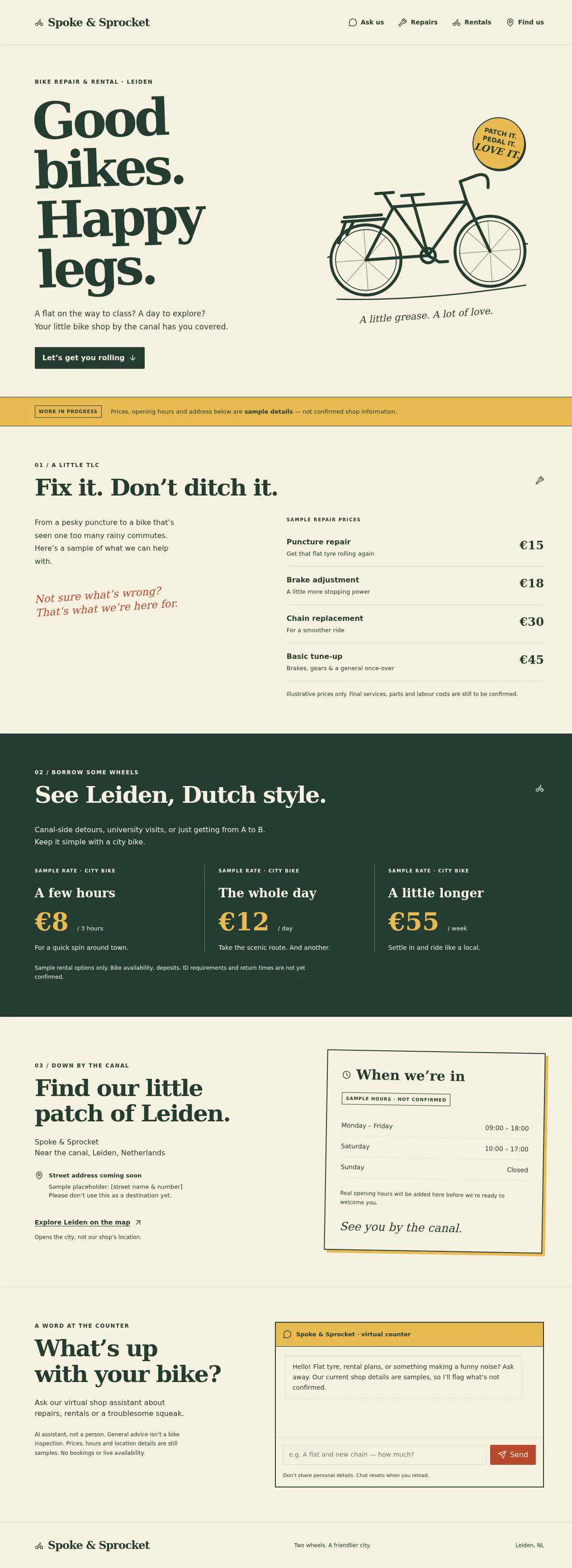
- Pass: The site shows services with prices, opening hours and an address or map · Clicked Repairs, Rentals and Find us: repair prices €15–€45, rentals €8 for 3 hours to €55 a week, opening hours and an address, marked as samples.
- Pass: Asking the price of a listed service answers with the price shown on the site · Asked the assistant what a new chain costs; it answered €30, the price listed on the site.
- Pass: Asking for advice about a common problem in the shop's trade gives a useful answer, not "I don't know" or a setup message · Asked about squealing brakes; it suggested cleaning the braking surfaces, warned against oil on them and said to stop riding if braking is weak.
- Pass: Asking for two services together gives both prices or their total, not just one · Asked for a puncture repair and a new chain together; it gave €15 and €30 and the total, €45.
- Pass: No visitor or owner sees a message about a missing key, account or connection · Asked about repair prices and opening hours; both got shop answers at once, with no key, account or connection message.
- Pass: A signed-out visitor asks two differently worded questions and gets relevant answers based on the shop's information · Signed out, asked about a puncture plus brakes (€15 + €18 = €33) and, worded differently, about a week's rental and Sunday (€55/week, closed Sunday).
Run
- Run: 11 Nov 2026 · vibe prompts
- Builder: the Framer 4 agent on GPT 6.1 Sol, in a new project
- Customer: an AI agent playing the owner of Spoke & Sprocket, writing in the Describe style
- Agent steps: 10 tool steps
- Prompt limit: 40 per app
- Cost: $0.22 for the builder, $0.04 for the judge
- Judge: an AI agent that tried each check in the live preview with a browser, signed out and signed in with each test account
AI chat
Every check passed: the assistant answered prices and repair questions with no setup.
- Result: Pass
- Checks: 6 of 6 pass
- Prompts: 3; every check passed after prompt 3
- Time: 2m27s in total
- Spent: $0.25
Prompt 1 of 3
Can you make a website for my bike repair and rental shop, Spoke & Sprocket, near the canal in Leiden? For now, I just want people to easily see what repairs and rentals we offer, what they cost, when we’re open, and where to find us. Our customers are mostly students, tourists and commuters. Make it feel friendly and a little scrappy, like a hand-painted shop sign—not a slick corporate site. I haven’t supplied our actual prices, hours or street address yet, so use clearly marked sample details for now rather than presenting them as real.
Built Spoke & Sprocket with a friendly shop-sign feel and clear repair,
- Pass: The site shows services with prices, opening hours and an address or map · Clicked Repairs, Rentals and Find us: repair prices €15–€45, rentals €8 for 3 hours to €55 a week, opening hours and an address, marked as samples.
Prompt 2 of 3
Can you add a friendly chat assistant so visitors can ask questions like they’re talking to us at the counter, without me having to sign up for another service? It should use the shop information on the site and understand everyday questions, not just exact wording. If someone asks what a repair costs, it should give the listed price; if they ask about two jobs together, it should give both prices or add them up. It should also offer useful, sensible advice for common bike problems, like a flat tyre or squeaky brakes, rather than just saying it doesn’t know. Keep it clear that our current prices, hours and address are still sample details, and don’t invent missing shop information.
Added a friendly AI counter assistant to the shop site—no extra service
- Pass: Asking the price of a listed service answers with the price shown on the site · Asked the assistant what a new chain costs; it answered €30, the price listed on the site.
- Pass: Asking for advice about a common problem in the shop's trade gives a useful answer, not "I don't know" or a setup message · Asked about squealing brakes; it suggested cleaning the braking surfaces, warned against oil on them and said to stop riding if braking is weak.
- Pass: Asking for two services together gives both prices or their total, not just one · Asked for a puncture repair and a new chain together; it gave €15 and €30 and the total, €45.
Prompt 3 of 3
Please make sure the chat works straight away for both me and visitors, without anyone having to enter a key, create another account or connect a service. Try a few real questions about repair prices, rental options and opening hours to check that it actually answers using the shop details, while still making clear those details are samples. Nobody should run into a missing-key, account or connection message.
The chat works without keys, extra accounts or service connections for you and visitors.
- Pass: No visitor or owner sees a message about a missing key, account or connection · Asked about repair prices and opening hours; both got shop answers at once, with no key, account or connection message.
- Pass: A signed-out visitor asks two differently worded questions and gets relevant answers based on the shop's information · Signed out, asked about a puncture plus brakes (€15 + €18 = €33) and, worded differently, about a week's rental and Sunday (€55/week, closed Sunday).
AI chat
Every check passed: the assistant answered prices and repair questions with no setup.
- Result: Pass
- Checks: 6 of 6 pass
- Prompts: 3; every check passed after prompt 3
- Time: 2m27s in total
- Spent: $0.25
Local shop site with an AI assistant
Test accounts:
- Admin: admin@example.com
Spoke & Sprocket is a small bike repair and rental shop by the harbourside in Bristol, UK, and this is its website. It shows what the shop does and what it costs, when it is open and where to find it, and it has a chat assistant that answers questions in visitors' own words from the shop's own information, like asking at the counter. The assistant uses the app's built-in AI, so nobody signs up for another service or enters a key.
The app has two roles.
- Visitors: students, tourists and commuters. They read the price lists, check the opening hours and the map, ask the assistant questions, and call or email the shop when the assistant cannot answer. They never sign in.
- The owner: (the app's admin account) keeps the shop's information up to date: services and prices, rentals, opening hours and closures, address and contact details, and frequent questions.
On first open, the site holds the shop's complete information: 12 repair services, 5 rental options, a week of opening hours, an address with a map, contact details and 10 frequent questions.
Nothing is broken and everything works. Every button, link and form does what it says with real data. No page shows placeholder text, sample images, "coming soon", "not set up yet", lorem ipsum, a missing-key message or a link to nowhere.
These are not part of Spoke & Sprocket: online booking or reservations, payments, visitor accounts, a shop for parts or accessories, a blog, reviews, a form for leaving a question for the shop and its emails, a log of visitors' chats for the owner, and an assistant that answers questions unrelated to bikes and the shop.
Brand and visual direction
Spoke & Sprocket's visitors are Bristol students on second-hand bikes, tourists who want a bike for a day, and commuters whose chain just snapped. Many read on a phone, standing next to a bike, and some are more at home in another language than English. They want a price, an answer and the way to the shop, fast. The shop itself is friendly and a bit scrappy, with a hand-painted sign, and the site should feel like walking in. Name and voice: The shop is Spoke & Sprocket, with the line "Bike repairs and rentals by the harbour, Bristol." The copy sounds like the person behind the counter: warm, direct, a little dry, in short sentences. "Flat tyre? £15, usually done while you wait." The site is in English, and the assistant answers in English, or in the visitor's own language when they write in another one. It uses no corporate phrases, exclamation marks in every line, emoji, or hype words such as "seamless", "solutions", "supercharge" or "unleash". Visual direction: The site looks like a hand-painted shop sign and a chalked price board: flat colour, chunky type, slightly imperfect edges, and nothing glossy.
- Colour: a warm cream page (about #F4EBD9), dark ink for text (about #1E1B16), a faded brick for secondary blocks (about #B9895B used sparingly as a background tint only), and one accent, a cobalt sign-paint blue (about #2448A8), used for the main action on a screen, the chat button, links and focus states. There are no gradients, glows, glass effects or purple-blue palettes.
- Type: Bitter in heavy weights for headings, price board titles and the wordmark, set like sign lettering; Rubik for body text, buttons and the chat. Prices use tabular figures and line up on the right of each price list. Body text is 16 to 17 px.
- Shape: chunky 2 px ink outlines on cards and buttons, medium radii (6 to 10 px), and a slight hand-cut feel from offset solid shadows (2 to 3 px, flat ink, no blur). Price lists are set as boards with dotted leaders between the service and the price.
- Layout: a single-column page on phone, and a 12-column grid with a maximum content width of about 1120 px on desktop. Repairs and rentals sit side by side on desktop, stacked on tablet and phone. The header holds the wordmark, Repairs, Rentals, Hours and Find us, plus an "Open now" or "Closed" badge. The chat button sits at the bottom right on every page.
- Imagery: drawn line illustrations in ink of tools and bike parts, made for the shop, and a map. There are no stock photos, 3D renders or AI-looking illustrations.
- Motion: short (150 to 200 ms) fades, and the chat panel sliding up in 200 ms. Nothing bounces.
- Every page works at 390 px wide with no horizontal scrolling, the chat panel fills the screen on a phone with the input above the keyboard, and every control is usable by keyboard with a visible focus ring.
Pages beyond the product: The footer shows the address, phone number, email and opening hours, and links to Privacy (what happens to chat messages, in plain words). A branded not-found page links back home.
Checks:
- Every page shows the Spoke & Sprocket wordmark, the same header with an open or closed badge, and the same footer with address, phone and hours
- The design follows the direction above: cream background, dark ink, one cobalt accent, heavy Bitter headings with Rubik text, chunky outlines and flat shadows, and no gradients or stock imagery
- The home page, the price lists and the chat panel have no horizontal scrolling at phone width, and the chat input stays visible above the phone keyboard
- Opening a made-up address shows a branded not-found page with a way back home
Shop information: what Spoke & Sprocket starts with
On first open, the site holds the shop's full information, written in its voice, and the owner can change all of it. Repairs (12): Puncture repair £15, new inner tube fitted £20, new tyre fitted £35 plus the tyre, brake adjustment £18, new brake pads £25, gear adjustment £20, new chain fitted £30, wheel truing £22, light repair or fitting £12, saddle or handlebar fitting £10, full service £65, and safety check for a second-hand bike £15. Each has a one-line description and a usual time, such as "While you wait, about 20 minutes". Rentals (5): City bike: £8 for 3 hours, £12 a day, £55 a week. E-bike: £25 a day, £120 a week. Kids' bike: £7 a day. Child seat add-on: £3 a day. Bike lock included with every rental. Each rental lists what is needed: a valid ID and a £50 deposit, returned on return. Hours: Monday to Friday 08:30 to 18:00, Saturday 09:00 to 17:00, Sunday 10:00 to 16:00, in UK time (Europe/London). One upcoming closure is set, such as Christmas Day. Where: 7 Chandlers Wharf, Bristol BS1 6QR, by the harbourside, the phone number 0117 496 0732, an email address, and directions from Bristol Temple Meads station by foot and by bike. Frequent questions (10): For example: can I wait while you fix it, do you take cards, do you repair e-bikes, what if my rental gets a flat, can I leave my bike overnight, do you sell second-hand bikes.
Checks:
- The repairs board lists 12 services with prices and usual times, and the rentals board lists 5 options with their prices per period
- The opening hours show every day of the week, and the upcoming closure is shown
- The frequent questions section shows 10 questions with answers, and none of the shop information looks like filler
Visitor: the shop website
The home page is one long, friendly page with sections that the header links jump to, so a visitor on a phone scrolls once and has everything. Top: The wordmark, the line "Bike repairs and rentals by the harbour, Bristol.", today's status ("Open now, until 18:00", "Opens tomorrow at 10:00", or "Closed today for Christmas Day") worked out in UK time, and two buttons: Ask us (opens the chat) and Find us (jumps to the map). Repairs: The repairs board with every service, its price, its usual time and a short description. Rentals: The rentals board with every option and its prices per period, what to bring, and the deposit. Hours: The week's opening hours with today highlighted, and any upcoming closure in a short note. Find us: The address, a map of the shop's location from OpenStreetMap with a pin, a "Directions" link that opens the route in the visitor's map app, the phone number as a tap-to-call link, the email as a mail link, and directions from Bristol Temple Meads. Questions: The frequent questions as open-and-close items, with a line under them: "Still wondering? Ask us" opening the chat.
Checks:
- A signed-out visitor sees the repairs board, the rentals board, the opening hours with today highlighted, and the map with a pin at the shop
- The header links jump to Repairs, Rentals, Hours and Find us, on desktop and phone
- The open or closed badge matches the opening hours for the current time in the UK, including the upcoming closure on its date
- On a phone, tapping the phone number starts a call and Directions opens the route in a map app
Visitor: asking the assistant
The chat button opens a panel titled "Ask the counter". It greets the visitor in one line and offers 4 example questions as buttons, such as "How much is a flat tyre?" and "Can I rent a bike for the weekend?". Answers: The assistant answers in the visitor's own words, from the shop's current information: services, prices, rentals, hours, closures, address and frequent questions. It is called from the backend with the app's built-in AI. It understands everyday phrasing ("my chain keeps falling off", "back tyre's gone soft again") and answers in English, or in the visitor's language when they write in another one. Answers stream in word by word, are short (usually under 80 words), and quote prices exactly as listed. Sums: When a visitor asks about more than one thing, it gives each price and the total, and says how it got there: "A puncture repair is £15 and brake pads are £25, so £40 together." Advice: For common bike problems (a flat tyre, squeaky brakes, a slipping chain, rattling mudguards) it gives sensible, safe first advice, says when to stop riding, and names the shop service and price that fixes it. Honesty: It never invents a service, price, hour or fact the shop has not given. When it does not know, it says so plainly and gives the shop's phone number and email, as working links. It declines questions that have nothing to do with bikes or the shop, politely and in one line. Conversation: Follow-up questions understand what came before ("and for a week?"). The conversation stays open while the visitor moves around the site, and "New chat" clears it. Links in answers (to the rentals board, the map, the phone number) work. Limits and errors: If the day's AI budget is used up, the panel says in plain words that the assistant is resting until tomorrow, shows the phone number and email, and offers Try again. If an answer fails, the panel says so and offers Try again without losing the visitor's question. No visitor or owner ever sees a message about a missing key, account or connection.
Checks:
- Asking "what does a new chain cost?" answers £30, the price on the repairs board
- Asking for a puncture repair and new brake pads together gives £15 and £25 and the total, £40
- Asking about squealing brakes gives useful, safe advice and names the brake adjustment service and its price, not "I don't know"
- Asking "and for a week?" right after asking about city bike rental answers £55, using the earlier question
- Asking a question in French gets an answer in French with the same prices
- Asking about something the shop has not listed, such as cargo bike rental, says it does not know and gives the shop's phone number and email, instead of inventing an answer
- A signed-out visitor never sees a message about a missing key, account or connection, on the preview or the published site
Owner: editing the shop's information
The owner signs in with the app's sign-in and opens Manage, a simple area made of forms in the same brand. Only the admin account can open it. A signed-out visitor who types its address is sent to sign-in, and any other signed-in account sees "Only the shop owner can open this". Repairs and rentals: Add, edit, reorder and remove services and rentals, each with a name, price (or prices per period), usual time and description. Prices are checked as amounts in pounds. Hours and closures: Set the hours for each day, mark a day closed, and add closures with a date range and a reason ("Closed for the bank holiday"). The open or closed badge and the hours section follow at once. Address and contact: Address, map pin (placed by searching the address), phone, email and directions. Frequent questions: Add, edit, reorder and remove questions and answers. Every change shows on the public site and in the assistant's answers at once, with no other step. Saving with a missing name or a price that is not a number is refused with a message next to the field.
Checks:
- The owner changes the price of a puncture repair to £17; the repairs board shows £17 and the assistant answers £17 when asked
- The owner adds a closure for next Saturday; the hours section shows it and the assistant says the shop is closed that day when asked
- The owner adds a frequent question and answer; it appears on the site and the assistant uses it to answer the same question in other words
- Saving a service with an empty price is refused with a clear message, and nothing on the public site changes
- A signed-out visitor who opens the Manage address is sent to sign-in, and a signed-in non-admin account sees that only the owner can open it
Speed and findability
The site is quick on a phone with weak signal by the harbour. The first screen with today's status and the price boards appears as soon as the page loads, without waiting for scripts or the chat. The map loads only when it scrolls into view and keeps its space reserved. The chat's first words appear within about 3 seconds of sending a question. The page has the title "Spoke & Sprocket: bike repairs and rentals in Bristol" and a description with the services and the area. The shop's name, address, phone, opening hours and price range are in the page's details for search engines and maps, and follow the owner's edits. Pasting the site's link into a chat app shows the name, the line and an image of the sign-style wordmark.
Checks:
- The home page shows today's status and the price boards within about 2 seconds on a phone, without layout jumps when the map loads
- The assistant's answer starts appearing within about 3 seconds of sending a question
- The page has a title and description naming the shop and Bristol, and its shop details for search engines match the current hours and address
Everything works
These checks apply to every screen above, for signed-out visitors and the owner. The number before each check is its weight: 3 means the app fails if the check fails, 2 a serious defect, 1 a defect worth noting.
For every app:
- Must pass: Every feature this spec describes is there, and each fix the agent claims holds when the original steps are repeated
- Serious: At phone (390 px), tablet (810 px) and desktop (1,200 px and up), the home page sections, the repairs and rentals boards, the map, the chat panel and the Manage forms show nothing cut off, no sideways scrolling, a reachable header with its section links, and inputs (the chat input included) of at least 16 px
- Serious: The header links jump to Repairs, Rentals, Hours and Find us; links in the assistant's answers, Privacy, tap-to-call, the mail link and Directions go to the right place; reloading Manage or Privacy on the live address works; a made-up address shows the branded not-found page; Back works
- Minor: The ink illustrations, the wordmark and the OpenStreetMap map with its pin load at the right shape without stretching, and pasting the site's live link into a chat app shows the shop's name, line and wordmark image, not a builder default
- Serious: Later work did not break earlier work: after the assistant and Manage are built, the 12 repairs, 5 rentals, the week's hours, the map and the 10 frequent questions are still there and unchanged unless the owner changed them
- Minor: After each prompt, the agent's reply says honestly what changed and what it could not verify (including anything that still needs a key or account), is never empty, never presents preview-only as done, and never claims a fix that is not there in the live app
For this app:
- Must pass: Every flow works end to end with fresh input, checked where it lands: a price, closure or frequent question the owner adds in Manage shows on the public site and in the assistant's answer to a newly worded question, and a visitor's own question gets a streamed answer from the shop's current information, not a canned reply
- Must pass: Services, rentals, prices, hours, closures, contact details, the map pin and frequent questions the owner adds, edits, reorders or removes stay as saved after a reload, in another browser, for a signed-out visitor and in the assistant's answers
- Must pass: Only the owner reaches Manage: a signed-out visitor is sent to sign-in, another signed-in account sees "Only the shop owner can open this", and neither can change the shop's information by sending a Manage request directly
- Must pass: On the published address, the owner signs in, reloads Manage, signs out and resets their password, with every link and redirect on the live domain, and no visitor screen asks a visitor to sign in or create an account
- Serious: The published site behaves like the preview: the assistant answers there with the built-in AI, Manage edits reach the live site and its answers, the open or closed badge follows UK time, and no live page mentions "preview"
- Serious: Loading and error states are clear and in plain words: the answer streaming in, a failed answer offering Try again with the question kept, the day's AI budget used up with the phone number and email, and Manage saving; no visitor or owner sees a missing key, account or connection message
- Serious: As a signed-out visitor, the page source and network requests contain no AI or other secret keys and no Manage-only data, and the chat panel and footer link to the Privacy page that says what happens to chat messages
- Minor: Manage refuses an empty name, a price that is not an amount in pounds, a closure that ends before it starts and a malformed phone number or email with a message next to the field, saving twice in a row creates no duplicate service, rental, closure or question, and sending an empty chat message does nothing
Done when
Checks:
- A signed-out visitor can see every repair and rental with prices, the opening hours with today's status, and the shop on a map, on a phone and on a desktop
- A signed-out visitor can ask the assistant several differently worded questions, in English and another language, and get correct prices, totals and useful advice from the shop's information, with no key or setup message anywhere
- A question the assistant cannot answer gets a plain "I don't know" with the shop's phone number and email, never an invented answer
- The owner can change a price, the hours or a frequent question, and the site and the assistant reflect it at once; only the owner can open Manage
AI chat
Every check passed: the assistant answered prices and repair questions with no setup.
- Result: Pass
- Checks: 6 of 6 pass
- Prompts: 3; every check passed after prompt 3
- Time: 2m27s in total
- Spent: $0.25
Spoke & Sprocket: the simulated customer
An AI agent plays the owner of Spoke & Sprocket and writes every prompt. It reads the spec and this file, never the Framer 4 agent's code.
- Style: Describe.
Persona and why it fits
Describe. Whether the assistant answers well is easier to explain in a couple of sentences (what was asked, what it said) than in a one-liner.
Prompt length and tone
- Length: 21 to 59 words: two to four plain sentences. Usually one goal per prompt with the reason or the expected result.
- Tone: Friendly and plain, full sentences, no headings or lists. Explains what they want and why, not how to build it.
- Language: English only.
Example prompts for this app:
- "I run a small bike repair and rental shop in Bristol. I'd like a site with our repairs and rentals and their prices, our opening hours and a map, plus a chat that answers customers' questions from that information."
- "When I asked the chat whether you're open on Sunday it gave a general answer instead of our hours. It should use the opening hours on the site."
- "chat button covers the phone number on mobile"
Style mix
Describe for 63% of prompts, Tweak 24%, Specify 12%, Brief 1%.
Switches come early and cluster around breakage: a failed fix or an unrequested change makes the next prompt likelier to be longer and more exact.
How they choose the next prompt
The most visible gap against the spec, described as a short scenario: who does what and what should happen. Broken flows come before missing features, and missing features before polish. Once the main flow works, they drop into short tweaks for polish. Order of attention for this app:
- Anything broken: a control that does nothing, a page that errors, a broken image or link, a layout broken on phone, a claimed change that isn't there.
- Repairs, rentals, prices in pounds, opening hours, closures, address and map.
- The assistant answering in any wording from the shop's own information, and giving the shop's phone and email when it can't.
- The owner keeping the information up to date, with no API key needed.
- Everything else in the spec, including the brand and copy rules, in spec order.
How they react to breakage
- Describes the failure as a short story: what they did, what happened, what they expected.
- Small visual problems get a short tweak instead (about a quarter of their turns).
- After a fix fails twice, or an edit breaks something unrelated, they write a longer guarded order that limits the scope and lists what must stay (the 12% spec share).
- If the agent claims success that they can't see, they ask it to check again and say what they see instead.
Stop rule
- They keep prompting until the judge says every check in the spec is met, or until prompt 40, whichever comes first.
- The persona shapes how they prompt and react, never when they stop: no giving up, no stopping early because it looks good enough.
- The judge also grades whether the agent's replies are honest (claimed changes match the app), so the simulated user reports false claims as they see them and doesn't take a claim on trust.