Paid AI tool
Demo, private notes and the free limit work; subscribing by card could not be checked.
- Result: Fail
- Checks: 6 of 7 pass, 1 not checked
- Prompts: 5
- Time: 4m27s in total
- Spent: $0.74
Checks
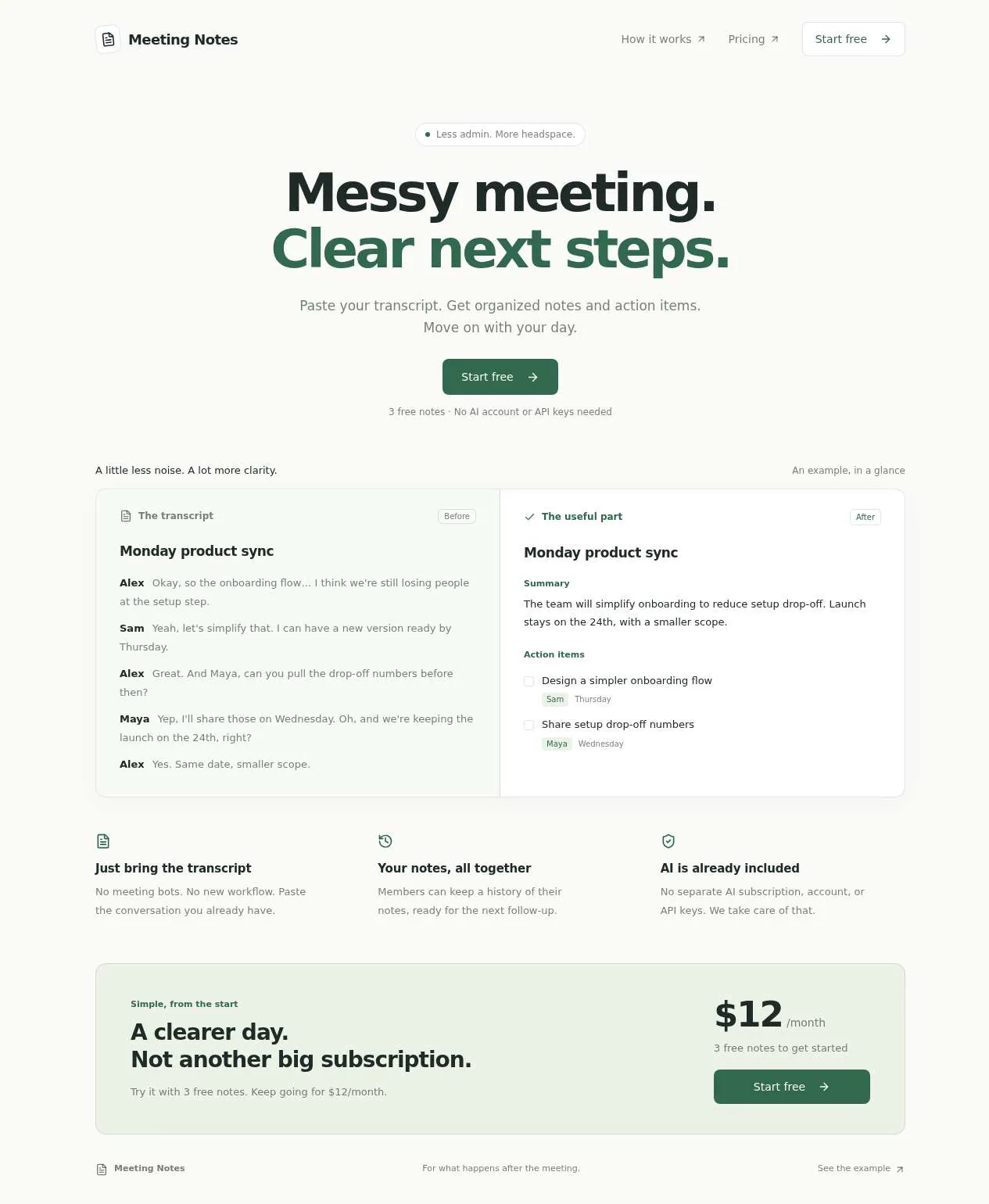
- Pass: A signed-out visitor sees what the product does, the free allowance and the price · Signed out, saw a before-and-after notes example and clicked Pricing: 3 free notes, then $12/month.
- Pass: A signed-in member pastes a transcript and gets notes with action items drawn from that transcript · Signed in, pasted a museum meeting transcript and clicked Write notes; got its decisions and action items for Nina and Omar with deadlines.
- Pass: The notes come from the transcript's content, not a fixed template or a "not connected" message · The museum notes named the roof leak and the $8,400 budget; a podcast transcript gave its own numbers and tasks, with no key or connection message.
- Pass: A member's saved notes appear in their history after a reload · Created a note, reloaded, and found it in History with its full contents.
- Pass: Another member cannot open the first member's notes, even by address · A second member opened the first member's note by address and saw 'Note not found', with an empty History.
- Not checked: After using the free notes, the member pays for the monthly plan with a test card, the payment completes, and they can create another note · After the 3 free notes, 'Connect Stripe to subscribe' said the owner must add a Stripe key and no payment was attempted.
- Pass: A member turns a pasted transcript into AI notes with action items and finds them again in their history · Pasted a warehouse transcript and got tasks for Omar (Friday) and Lena (tomorrow); after a reload it was in History, and a second member got 'Note not found'.
Run
- Run: 11 Nov 2026 · vibe prompts
- Builder: the Framer 4 agent on GPT 6.1 Sol, in a new project
- Customer: an AI agent playing the owner of Afterword, writing in the Brief style
- Agent steps: 30 tool steps
- Prompt limit: 40 per app
- Cost: $0.64 for the builder, $0.11 for the judge
- Judge: an AI agent that tried each check in the live preview with a browser, signed in with each test account
Paid AI tool
Demo, private notes and the free limit work; subscribing by card could not be checked.
- Result: Fail
- Checks: 6 of 7 pass, 1 not checked
- Prompts: 5
- Time: 4m27s in total
- Spent: $0.74
Prompt 1 of 5
Please build the landing page for my meeting-notes tool. Busy managers should immediately understand that they can paste a messy meeting transcript and get clean notes with clear action items. Keep it crisp, modern, and calm—something in the spirit of Granola or Raycast, with a small before-and-after example so the benefit is obvious. Visitors should see this page before any sign-in screen. Show a clear “Start free” button, explain that members can keep a history of their notes, and make the free allowance and monthly price easy to spot. For now, let’s offer 3 free notes, then $12/month. Also reassure people that they don’t need their own AI account or keys.
Built the public landing page with a before-and-after example, clear
- Pass: A signed-out visitor sees what the product does, the free allowance and the price · Signed out, saw a before-and-after notes example and clicked Pricing: 3 free notes, then $12/month.
Prompt 2 of 5
Now I’d like signed-in members to be able to paste a messy meeting transcript and turn it into clean, readable notes with clear action items. Please make the results genuinely reflect what was said, including decisions and who’s doing what when that’s mentioned, rather than showing a canned example. If an owner or deadline wasn’t discussed, don’t invent one. This should actually work without me supplying my own AI account or keys, and give a clear indication while the notes are being written.
Added the signed-in notes workspace with real AI generation, a writing
- Pass: A signed-in member pastes a transcript and gets notes with action items drawn from that transcript · Signed in, pasted a museum meeting transcript and clicked Write notes; got its decisions and action items for Nina and Omar with deadlines.
- Pass: The notes come from the transcript's content, not a fixed template or a "not connected" message · The museum notes named the roof leak and the $8,400 budget; a podcast transcript gave its own numbers and tasks, with no key or connection message.
Prompt 3 of 5
Please make sure my saved meeting notes stay in my history, including after I reload the page or sign out and back in, and that I can open an earlier note to read it again. Keep the history easy to scan and in the same calm style as the workspace. Meeting transcripts can be sensitive, so each member should only see their own notes. Please make sure another signed-in member can’t read mine, even if they have the exact link to a note.
Your history now shows dated notes, newest first, with earlier notes
- Pass: A member's saved notes appear in their history after a reload · Created a note, reloaded, and found it in History with its full contents.
- Pass: Another member cannot open the first member's notes, even by address · A second member opened the first member's note by address and saw 'Note not found', with an empty History.
Prompt 4 of 5
Please add the free allowance and monthly subscription now: each member gets 3 free notes, then needs to subscribe for $12/month to create more. Show how many free notes they have left, and when they run out, give them a clear, calm way to subscribe without losing their transcript or access to saved notes. Keep card payments in test mode while we’re testing. I want to be able to use all 3 free notes, pay with a test card, and then immediately create another note. Make the payment success or failure clear, and remember their subscription when they come back.
Added the 3-note allowance, remaining count, and $12/month subscription controls.
Prompt 5 of 5
I used all 3 free notes, but clicking “Subscribe · $12/month” just shows “Test payments are not configured. Add the Stripe test secret key.” Please fix this so the subscription actually works in test mode, rather than stopping at that error. If you need me to connect a payment account, make that setup clear. I need to be able to run out of free notes, pay $12/month with a test card, and immediately create another note without losing my pasted transcript. Please show a clear payment result, keep saved notes accessible, and remember the subscription when I return. No real charges while we’re testing.
Added clear Stripe sandbox setup instructions and automatic payment confirmation when
- Not checked: After using the free notes, the member pays for the monthly plan with a test card, the payment completes, and they can create another note · After the 3 free notes, 'Connect Stripe to subscribe' said the owner must add a Stripe key and no payment was attempted.
- Pass: A member turns a pasted transcript into AI notes with action items and finds them again in their history · Pasted a warehouse transcript and got tasks for Omar (Friday) and Lena (tomorrow); after a reload it was in History, and a second member got 'Note not found'.
Paid AI tool
Demo, private notes and the free limit work; subscribing by card could not be checked.
- Result: Fail
- Checks: 6 of 7 pass, 1 not checked
- Prompts: 5
- Time: 4m27s in total
- Spent: $0.74
AI tool with free tier and subscription
Test accounts:
- Member: member@example.com
- Second member: member.2@example.com
Afterword turns a messy meeting transcript into clean notes: a short summary, the decisions made, the action items with who does what and by when, and the questions left open. It is for busy managers who leave one meeting and walk straight into the next. Visitors first see what it does on a calm landing page, then sign up. Members paste a transcript, get notes written by the app's built-in AI, and keep a private history of every note. The first 3 notes are free; after that, Afterword Pro costs $12 a month, paid by card. Nobody needs their own AI account or keys.
The app has two roles.
- Visitors: read the landing page, try the before-and-after example and see the free allowance and the price. They cannot write notes without signing up.
- Members: sign in with the app's sign-in, write notes from transcripts, keep and search their history, tick off action items, and subscribe to Afterword Pro when their free notes run out. Each member sees only their own notes.
On first open, member@example.com already has 2 notes in their history from realistic meetings and 1 free note left, member.2@example.com starts with no notes and 3 free notes, and the workspace offers three realistic sample transcripts to try.
Nothing is broken and everything works. Every button, link and form does what it says with real data. No page shows placeholder text, sample images, "coming soon", "not set up yet", lorem ipsum or a link to nowhere. Notes are always written from the transcript by the built-in AI, card payment really works in Stripe test mode, and every email really arrives in the recipient's inbox.
These are not part of Afterword: recording or transcribing audio, joining calls, calendar or video-call integrations, sending notes to Slack, Notion or task tools, shared team workspaces, sharing notes by public link, uploading transcript files, emailing notes, rewriting a note from the same transcript, a chat with the transcript, an admin area, annual plans, and a mobile app.
Brand and visual direction
Afterword is for managers and team leads with back-to-back meetings: heads of product, operations leads, agency account directors. They already have a transcript from Zoom, Google Meet or Teams and no time to read it. They trust tools that are quiet and precise, like Granola or Raycast, and they distrust anything that shouts about AI. The product has to look like it will not waste a minute.
Name and voice: The product is called Afterword, with the line "Clean notes from messy meetings." An afterword is what comes after the main text, which is what the notes are. The voice is crisp, calm and exact: short sentences, concrete nouns, no adjectives that do not carry information. Buttons say what happens: "Start free", "Write notes", "Copy notes", "Subscribe for $12 a month", "Manage billing". The product says "notes", not "magic". There are no exclamation marks, no emoji, no sparkle icons and no hype words: never "AI-powered magic", "supercharge", "unleash", "10x", "revolutionize" or "effortless".
Visual direction: Afterword looks like a good notebook on a clean desk: soft neutral surfaces, very little colour, precise type and one confident accent.
- Colour: a soft warm white page (about #FAFAF8), white surfaces for the note and the editor (#FFFFFF), graphite text (about #1D1F1E), cool grey for secondary text (about #6B706E) and hairline borders (about #E4E5E2). There is one accent, a deep teal (about #0E6E6A), used only for the main action on a screen, ticked action items and focus rings. Errors use a muted brick text colour, never a red banner. There are no gradients, glows, glass effects, sparkles or purple-blue palettes.
- Type: Geist for the interface, headings and notes, with Newsreader italic used sparingly for the landing page's large headline phrase and the note summary's first line. Body text is 15 px in the workspace and 17 px on the landing page; names, dates and amounts use tabular figures.
- Shape: 8 px corners on surfaces and buttons, 1 px borders instead of shadows, apart from one very soft shadow under the open note. Generous padding and quiet dividers.
- Layout: the landing page uses a 12-column grid with a maximum width of about 1120 px. The workspace has a left column with the history (about 280 px) and the note or editor on the right, with a reading width of about 720 px. On tablet the history collapses into a drawer, and on phone the history is its own screen and the note fills the width.
- Imagery: real product screens only: the before-and-after example on the landing page is the actual editor and note, built in the page with a real sample transcript. There are no stock photos, people at whiteboards, robot or brain icons, 3D shapes or AI illustrations.
- Motion: short (150 to 200 ms) fades. While notes are being written, the note's sections fill in as they arrive, with a quiet line "Writing notes from 4,212 words"; nothing pulses or glows.
- Every page works at 390 px wide with no horizontal scrolling. Every control works by keyboard with a visible teal focus ring, and Ctrl or Cmd plus Enter writes the notes from the editor.
Pages beyond the product: The footer links to real pages with real content: How it works, Pricing, Privacy (what is stored, that transcripts are only used to write the member's notes, how to delete everything), Terms, Security (who can see a note: only its owner) and a contact email. A branded not-found page says "Nothing was said here" and links back home.
Checks:
- Every page shows the Afterword wordmark and the same header and footer, and every footer link opens a page with real content, not a placeholder
- The design follows the direction above: soft white surfaces, graphite text, one teal accent for main actions, Geist with sparing Newsreader italic, hairline borders, real product screens and no gradients, sparkles or stock imagery
- The landing page, the workspace and a note have no horizontal scrolling at phone width, and their main actions stay reachable
- Opening a made-up address shows the branded not-found page with a way back home
Notes: what Afterword starts with
On first open, Afterword holds real content so every screen has something meaningful.
Sample transcripts: Three realistic transcripts, written as real exports with speaker names and times, each 1,500 to 4,000 words: a weekly product team sync (five people, a release date slipping, two decisions), a client call at a design agency (budget and scope change, a deadline), and a warehouse operations stand-up (a broken loading dock, staffing over a holiday weekend). Each fills the editor with one click.
member@example.com: Two notes already in history, written from two different transcripts on different days: "Q3 roadmap review" with 4 action items, 1 of them ticked, and "Hiring loop for senior designer" with 3 action items. One free note is left.
member.2@example.com: No notes, 3 free notes left, and an empty history that invites them to write their first note.
Checks:
- member@example.com's history shows two notes with their titles and dates, and the counter shows 1 free note left
- member.2@example.com sees an empty history with a clear invitation, and 3 free notes left
- Each of the three sample transcripts fills the editor with one click
Visitor: the landing page
Top: One clear headline ("Your meeting, minus the meeting.", with the last phrase in Newsreader italic), one sentence on what Afterword does, the "Start free" button and a quiet line underneath: "3 notes free. No AI account or keys needed."
Before and after: The real editor holding part of the product team sync transcript on the left, and the note Afterword wrote from it on the right: summary, decisions, action items with owners and dates, and open questions. Tabs switch between the three sample meetings. A note above it says that the example was written by Afterword from the transcript shown.
How it works: Three steps in plain words: paste the transcript from Zoom, Google Meet or Teams; get notes in about twenty seconds; find every note again in your private history.
Pricing: Two plans side by side: Free, with 3 notes in total and a full history, and Pro at $12 a month, with unlimited notes within fair use (up to 200 a month), cancel any time. Each has its button: "Start free" and "Start free, then subscribe".
Questions: Five short questions that open and close: Which transcripts work? Is my transcript private? Do I need an AI account? What happens after 3 notes? How do I cancel?
Clicking "Start free" opens sign-in. After signing in for the first time, the member lands in the workspace with the editor ready.
Checks:
- A signed-out visitor sees what Afterword does, the before-and-after example, 3 free notes and $12 a month, before any sign-in screen
- Switching the example tabs shows a different transcript and its own notes
- Start free opens sign-in, and after signing in the member lands in the workspace with the editor ready
- A signed-out visitor who types the address of the workspace or of a note is asked to sign in and sees no notes
Member: writing notes
The editor: A large, quiet text area with "Paste a transcript" and "Try a sample", which offers the three sample transcripts and fills the text box with the chosen one. A line under the editor shows the word count and the free notes left ("1 free note left").
Limits and validation: A transcript needs at least 150 words; anything shorter is refused with "This looks too short to be a meeting. Paste at least 150 words." Transcripts over about 30,000 words (around three hours of talk) are refused with the limit stated. The pasted text is never lost on any of these errors.
Writing: "Write notes" sends the transcript to the app's built-in AI from Afterword's backend. While it writes, the note's sections fill in as they arrive. The finished note has:
- a title drawn from the meeting ("Spring release: date moves to 14 May"), which the member can rename;
- a three-to-five-sentence summary;
- the decisions, each one line;
- the action items, each with the task, the owner and the due date when the transcript says them, and "No owner named" or "No date set" when it does not, never invented;
- open questions that were raised and not answered.
The note comes only from what was said in that transcript, in the transcript's language: a Spanish transcript gets Spanish notes. Each written note uses one free note for members on the Free plan; a note that fails to write uses nothing.
Errors and the AI budget: If writing fails, the member sees "The notes could not be written. Your transcript is still here." with a Try again button. If the app's AI budget for the day is used up, they see a clear notice that says so, that their transcript is kept, and that they can try again later or tomorrow, with a Try again button; no note is used.
Checks:
- member.2@example.com pastes the warehouse sample transcript and gets notes whose summary, decisions and action items name the people, numbers and tasks from that transcript
- Notes written from two different transcripts are clearly different and each matches its own transcript, with no fixed template or "not connected" message
- An action item with no owner in the transcript shows "No owner named" instead of an invented name
- Pasting 20 words is refused with a clear message, and the pasted text stays in the editor
- After writing a note on the Free plan, the free notes counter goes down by one
Member: reading and using a note
A note opens at its own address, such as /notes/spring-release-date-moves. It shows the title, the meeting date (taken from the transcript or the day it was written, editable), the summary, decisions, action items and open questions, and a "Show transcript" toggle with the original text.
Action items: Each action item has a checkbox. Ticking it marks it done in teal and saves at once. The note's header shows "2 of 5 done".
Editing: The member can edit any line of the note, rename it and change its date. Edits save automatically, with a quiet "Saved" mark.
Copying: "Copy notes" copies the note as clean text with headings and bullets that paste well into email, Slack or a document, and confirms "Copied".
Deleting: "Delete note" removes the note and its transcript after confirming. It disappears from history and its address shows "Note not found".
Checks:
- The member ticks two action items; the header shows them as done and they stay ticked after a reload
- Editing a decision and reloading shows the edited text
- Copy notes confirms "Copied" and pastes as readable text with headings and bullets
- Deleting a note removes it from history, and its address then shows "Note not found"
Member: history and privacy
History: The left column lists every note, newest first, grouped by Today, This week, Earlier, with the title, date and the count of open action items. A search box finds notes by words in the title, summary, action items or transcript, and highlights the match. Clicking a note opens it; "New note" opens the editor. A search with no results says so and offers to clear it.
Privacy: Each note belongs only to the member who wrote it. Another member who opens its address, signed in or not, sees "Note not found", with no title, text or hint that it exists. Search and history never show another member's notes. The Privacy page states the same in plain words.
Deleting the account: The account page has "Delete my account and notes". After typing the email to confirm, every note and transcript is removed, any subscription is cancelled in Stripe, and the member is signed out.
Checks:
- member@example.com's notes stay in history after a reload and after signing out and back in, and each opens with its full contents
- Searching history for a person's name from an action item finds that note
- member.2@example.com who opens the address of a member@example.com note sees "Note not found" and nothing of it, and their history does not show it
- A signed-out visitor who opens a note's address is asked to sign in, and after signing in as a different member sees "Note not found"
Member: free notes and subscribing
The counter: Members on the Free plan always see how many free notes they have left, under the editor and on the account page. Subscribers see "Afterword Pro" instead.
Running out: When a member with no free notes left presses "Write notes", their transcript stays in the editor and a calm panel opens: "You've used your 3 free notes. Subscribe to Afterword Pro for $12 a month to keep writing. Your saved notes stay yours either way." with "Subscribe for $12 a month". Their history and every saved note stay open to read and copy.
Paying: "Subscribe for $12 a month" opens Stripe Checkout in test mode for "Afterword Pro" at $12 per month, a Stripe Billing subscription, with the member's email filled in. Paying with Stripe's test card 4242 4242 4242 4242, any future expiry date and any security code completes. Stripe then sends its signed webhook to Afterword, and only that webhook turns Pro on. The member returns to the workspace with their transcript still in the editor and a quiet notice: "Confirming your payment", which changes within a few seconds to "Afterword Pro is active". They can write the note straight away. Opening the return address without paying gives nothing.
Unfinished or failed payment: Leaving Checkout returns to the editor with the transcript and "No payment was made. You're still on the Free plan." A declined test card (4000 0000 0000 0002) shows Stripe's error in Checkout and nothing changes.
Confirmation email: When the webhook confirms the subscription, the published app sends an email with the subject "Afterword Pro is active", with the plan, the price, the next billing date and how to cancel. Stripe sends its own receipt.
Managing: The account page shows the plan, the next billing date and "Manage billing", which opens the Stripe customer portal to update the card, see invoices or cancel. After cancelling, Stripe's webhook updates Afterword: the account shows "Pro until 14 December", the member can write notes until then, and afterwards returns to the Free plan with 0 free notes and all their notes kept. A failed renewal shows a calm notice with a link to the portal.
Checks:
- member@example.com writes a note with their last free note, then on the next transcript sees the subscribe panel with their transcript still in the editor
- The member subscribes in Stripe Checkout with the test card 4242 4242 4242 4242, returns with the transcript still there, sees "Afterword Pro is active" and writes the note
- Leaving Checkout without paying keeps the member on the Free plan with their transcript, and Write notes still shows the subscribe panel
- The "Afterword Pro is active" email arrives in the member's inbox with the price and the next billing date
- After a reload and signing in again, the member is still on Afterword Pro, and Manage billing opens the Stripe customer portal for their subscription
- With no free notes left and no subscription, the member can still open and copy every saved note
Speed and findability
Afterword feels instant. The landing page shows its headline, example and pricing as soon as the page loads, without waiting for scripts. The workspace opens with the history and the editor ready in about a second, and switching between notes in history does not reload the page. The first section of a note starts appearing within a few seconds of pressing Write notes, and a 4,000-word transcript is fully written in under about 30 seconds.
The landing page, How it works and Pricing each have their own title and description, for example "Afterword: clean notes from messy meetings", and a share image of the before-and-after example. The sitemap lists the public pages only. Notes, the workspace and account pages are never in the sitemap and are not shown to search engines.
Checks:
- The landing page shows its headline and the example within about 2 seconds with no layout shift
- After pressing Write notes on a sample transcript, the first section appears within a few seconds and the full note within about 30 seconds
- Public pages have their own titles and descriptions, and the sitemap lists no note or workspace address
Everything works
These checks apply to every screen above, for visitors and members. The number before each check is its weight: 3 means the app fails if the check fails, 2 a serious defect, 1 a defect worth noting.
For every app:
- Must pass: Every feature this spec describes is there, and each fix the agent claims holds when the original steps are repeated
- Serious: At phone (390 px), tablet (810 px) and desktop (1,200 px and up), the landing page, the before-and-after example, pricing, the workspace editor, the history drawer or screen, a note, the subscribe panel and the account page show nothing cut off, no sideways scrolling, a reachable header and menu, and inputs of at least 16 px
- Serious: Every header and footer link, "Start free", each history entry, "New note" and "Manage billing" go to the right page; reloading a note's address, the workspace or the account page on the live address works; a made-up address shows the "Nothing was said here" page; Back returns from a note to the history where it was
- Minor: The before-and-after example and the note render at the right shape with no clipped or overlapping sections, and pasting the landing page's live link into a chat app shows Afterword's title and its share image, not a builder default
- Serious: Later work did not break earlier work: after subscriptions, search and account deletion are built, writing notes, the free counter, member@example.com's two starting notes and the three sample transcripts still work and are unchanged
- Minor: After each prompt, the agent's reply says honestly what changed and what it could not verify (including anything that still needs a key or account), is never empty, never presents preview-only as done, and never claims a fix that is not there in the live app
For this app:
- Must pass: Every flow works end to end with fresh input, checked where it lands: a transcript the member pastes, not only a sample, becomes notes that name its own people, decisions and tasks in its own language, appear first in history and lower the free counter by one; paying turns on Pro and the member writes the next note
- Must pass: Notes, renamed titles, edited lines, changed dates, ticked action items, deleted notes, the free counter and the Pro plan stay as saved after a reload, after signing out and in, and in another browser
- Must pass: A member reaches only their own notes: member.2@example.com and a signed-out visitor opening a member@example.com note's address, or a changed note address, see sign-in or "Note not found" with no title or text, and no member can turn on Pro or add free notes without paying
- Must pass: On the published address, member.2@example.com signs up, confirms by email, signs in, reloads, signs out and resets their password, and every link and redirect, including Stripe's return, lands on the live domain
- Must pass: In Stripe test mode, the card 4242 4242 4242 4242 completes "Afterword Pro" at $12 a month, and only Stripe's webhook turns Pro on; leaving Checkout, a declined card or opening the return address alone changes nothing; cancelling in the customer portal shows "Pro until" its end date and then returns the member to Free with every note kept
- Serious: The "Afterword Pro is active" email arrives in a real inbox from the app's address, not in spam, with the plan, $12 a month, the next billing date in the member's time zone and how to cancel, and its plain text reads cleanly
- Serious: The published app behaves like the preview: the built-in AI writes notes, Stripe Checkout and the webhook, the customer portal and the email work there, and no live page mentions "preview" or test setup
- Serious: Empty states (member.2@example.com's empty history, a history search with no results), the "Writing notes" progress, the subscribe panel, a failed write, the AI budget notice and a failed renewal are clear and in plain words, keep the transcript, and show no technical, key or setup text
- Serious: As a signed-out visitor and as another member, the page source and network requests contain no AI or Stripe secret keys and no other member's notes or transcripts; the sign-up page and the account page link to the Privacy page
- Minor: The editor refuses a transcript under 150 words or over the limit with a clear message and the text kept, and pressing Write notes or Subscribe twice in a row creates one note and one subscription, using one free note at most
- Minor: Searching history finds a note by a word in its title, a partial word, an action item's owner and a word from its transcript, highlights the match, and shows the empty state with a way to clear it for a word that matches nothing
Done when
Checks:
- A signed-out visitor understands what Afterword does, sees 3 free notes and $12 a month, and signs up from the landing page
- A member turns a pasted transcript into AI notes with a summary, decisions and action items drawn from that transcript, and finds them again in their history after a reload
- Another member cannot see or open those notes, even by address
- After using the free notes, a member subscribes with Stripe's test card 4242 4242 4242 4242, keeps their transcript, receives the confirmation email and writes another note
- Every page looks calm and precise in Afterword's own brand, and nowhere shows a placeholder, dead link or "not set up" state
Paid AI tool
Demo, private notes and the free limit work; subscribing by card could not be checked.
- Result: Fail
- Checks: 6 of 7 pass, 1 not checked
- Prompts: 5
- Time: 4m27s in total
- Spent: $0.74
Afterword: the simulated customer
An AI agent plays the owner of Afterword and writes every prompt. It reads the spec and this file, never the Framer 4 agent's code.
- Style: Brief.
Persona and why it fits
Brief. SaaS founders commonly paste a full product brief (positioning, pricing, free tier) drafted with another AI before building.
Prompt length and tone
- Length: Opens with a brief of 100 to 400 words, written like an AI-drafted product brief with headings, sections and tone notes. Follow-ups are mostly short tweaks or guarded orders.
- Tone: The brief is polished and structured ("Build a…", sections, sometimes "Act as a senior product designer"). Follow-ups are their own voice: shorter and more direct.
- Language: English only.
Example prompts for this app:
- "Build Afterword, an AI web app that turns a pasted meeting transcript into clean meeting notes. Audience: busy managers who leave one meeting and walk straight into the next. Landing page: a headline, what it does, a before-and-after example, the free allowance (3 notes) and the price ($12 a month for Afterword Pro). App: sign up with email; paste a transcript; get a short summary, the decisions made, action items with who does what and by when, and open questions. Members keep a private, searchable history of their notes that only they can see. After 3 free notes, they subscribe by card before making more. I don't want to add my own AI key. Tone: crisp and practical. Look: calm, light, one accent colour, no stock photos."
- "Notes page only: action items must be a checklist, each with an owner when the transcript names one, and ticking one must be saved. Change nothing else."
- "history shows other people's notes??"
Style mix
Turn 1 is always the brief. After that:
- Brief: 40% · 17% · 33% · 10%
Switches come early and cluster around breakage: a failed fix or an unrequested change makes the next prompt likelier to be longer and more exact.
How they choose the next prompt
After the brief, they compare the result with their own brief, section by section. Whatever is most missing or most broken goes next. A whole missing section gets a guarded spec order; a detail gets a short line. Order of attention for this app:
- Anything broken: a control that does nothing, a page that errors, a broken image or link, a layout broken on phone, a claimed change that isn't there.
- The landing page with the example, free allowance and price.
- Turning a pasted transcript into notes, with a private, searchable history.
- The free limit and the card subscription, with no owner AI key.
- Everything else in the spec, including the brand and copy rules, in spec order.
How they react to breakage
- Right after the first build, about half send a Specify-style correction (median turn 2) and half send short tweaks.
- If the first build is far from the brief, about 1 in 10 later prompts is the brief again, re-pasted with the missing parts highlighted.
- Broken controls get a short line; anything the agent removed gets a guarded order to put it back.
- If the agent claims a section exists that isn't there, they paste the section of the brief and ask where it is.
Stop rule
- They keep prompting until the judge says every check in the spec is met, or until prompt 40, whichever comes first.
- The persona shapes how they prompt and react, never when they stop: no giving up, no stopping early because it looks good enough.
- The judge also grades whether the agent's replies are honest (claimed changes match the app), so the simulated user reports false claims as they see them and doesn't take a claim on trust.